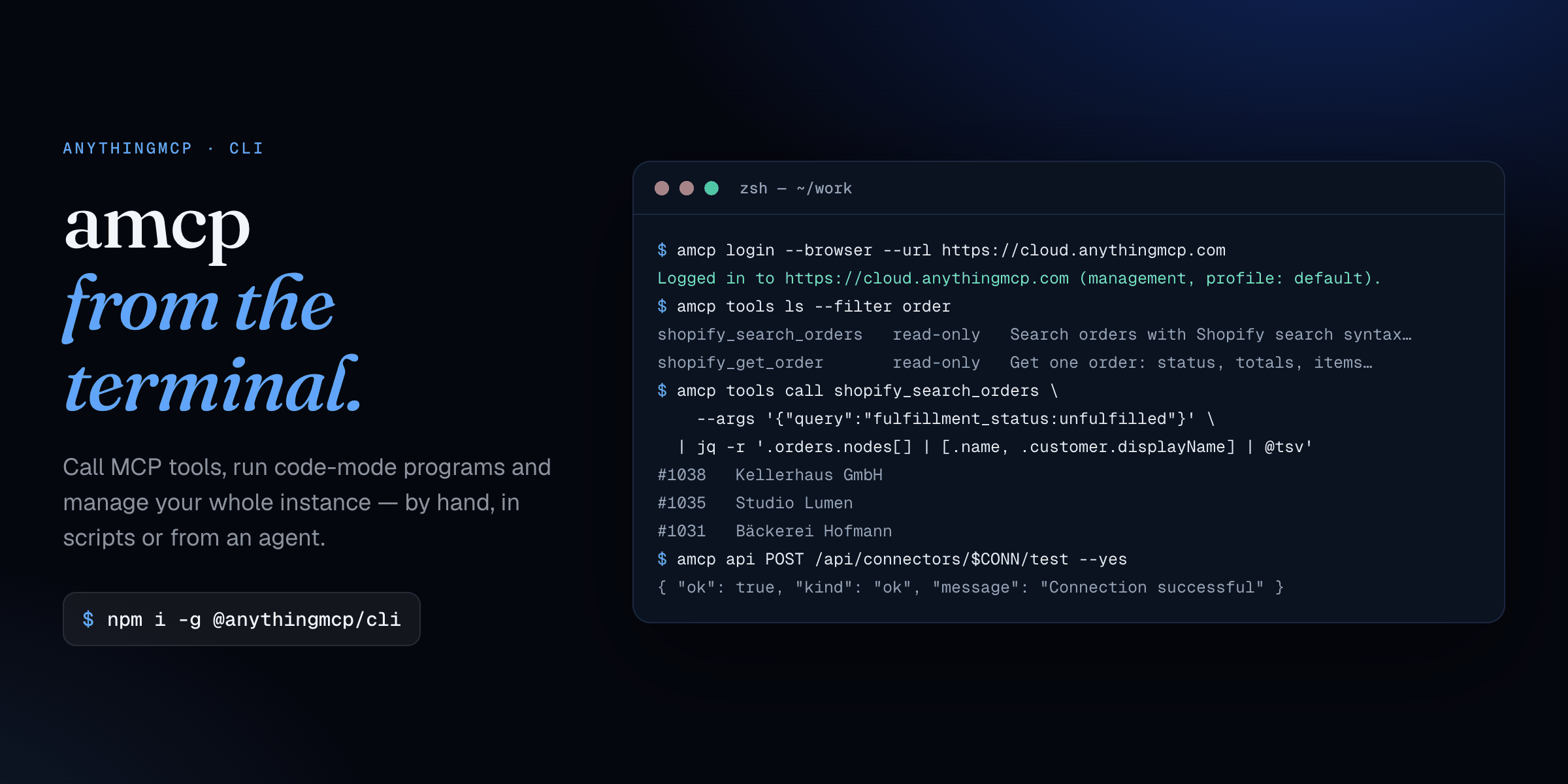
Call MCP tools, run code-mode programs and manage your whole MCP gateway from the terminal.
The official command-line client for AnythingMCP, the open-source agent harness and MCP gateway.



Website · Guide with examples · API reference · AnythingMCP on GitHub
amcp does two jobs with one binary:
- Calls MCP tools. These are the same tools your AI clients use (Shopify, HubSpot, SAP, Odoo, Postgres, an SFTP share…). You can run them by hand, in shell scripts, from cron and CI, or as a code-mode program that loops over dozens of tool calls in a single step.
- Drives the management API. With a management-scoped key, everything the dashboard does — connectors, MCP servers, users, roles, SSO, memory, skills, learning projects, audit — is one
amcp apicommand away, for a person or for a connected AI agent.
It works with AnythingMCP Cloud and self-hosted instances.
npm i -g @anythingmcp/cliOr with Homebrew on macOS and Linux, which also installs Node.js and the shell completions:
brew install helpcode-ai/tap/amcpWith npm, it requires Node.js 22.12 or newer. The examples below use real commands, flags, endpoints and tool names (the Shopify, HubSpot and Slack tools come from the built-in catalogue connectors). Only the data in the output is invented.
- Quick start
- Recipes
- Command reference
- Management API (
amcp api) - Shell completion
- Security
- About AnythingMCP
amcp uses two kinds of key, each in its own profile:
| You want to… | Key | Log in with |
|---|---|---|
| Call the tools of one MCP server | an MCP key for that server | amcp login --url … --server SERVER_ID |
Manage the instance (amcp api) |
a management key (read-only or admin) | amcp login --browser |
$ amcp login --url https://cloud.anythingmcp.com --server cmob60dvv00c01zrpeujwmnep
MCP API key:
Logged in to https://cloud.anythingmcp.com (profile: default).

$ amcp tools ls --filter order
shopify_search_orders   read-only   Search orders with Shopify search syntax (for example `financial_status:paid …
shopify_get_order       read-only   Get one order: status, totals (subtotal, shipping, tax, discounts, refunds) …

$ amcp login --browser --scope admin --url https://cloud.anythingmcp.com
Logged in to https://cloud.anythingmcp.com (management, profile: default).

$ amcp api GET /api/mcp-servers | jq -r '.[] | "\(.id)  \(.name)"'
cmob60dvv00c01zrpeujwmnep  Default
cmoc2k4hd00f11zrp9xq3vbnw Salestools describe prints a tool's full description and input JSON schema. tools call runs the tool with arguments that match it:
$ amcp tools describe shopify_search_orders
$ amcp tools call shopify_search_orders \
    --args '{"query":"financial_status:paid created_at:>=2026-11-01","first":2}'
{
  "orders": {
    "pageInfo": { "hasNextPage": true, "endCursor": "eyJsYXN0X2lkIjo2…" },
    "nodes": [
      {
        "name": "#1043",
        "displayFinancialStatus": "PAID",
        "displayFulfillmentStatus": "UNFULFILLED",
        "currentTotalPriceSet": { "shopMoney": { "amount": "412.80", "currencyCode": "EUR" } },
        "customer": { "displayName": "Kellerhaus GmbH" }
      },
      …
Arguments can also come from a file (--args @args.json) or from stdin (--args -).
A tool's text output is its JSON on stdout. Errors go to stderr with a distinct exit code, so amcp composes like any Unix tool:
$ amcp tools call shopify_search_orders \
    --args '{"query":"fulfillment_status:unfulfilled created_at:<2026-11-03"}' \
  | jq -r '.orders.nodes[] | [.name, .customer.displayName, .createdAt[:10]] | @tsv'
#1038   Kellerhaus GmbH     2026-10-30
#1035   Studio Lumen        2026-10-29
#1031   Bäckerei Hofmann    2026-10-28
A daily job that posts late orders to Slack (the Slack connector sits on the same MCP server):
#!/usr/bin/env bash
# late-orders.sh — run from cron: 0 8 * * 1-5
set -euo pipefail
SINCE=$(date -d '-2 days' +%F)     # GNU date; on macOS: date -v-2d +%F
LATE=$(amcp tools call shopify_search_orders \
  --args "{\"query\":\"fulfillment_status:unfulfilled created_at:<$SINCE\"}" \
  | jq -r '.orders.nodes[] | "• \(.name) — \(.customer.displayName)"')
[ -z "$LATE" ] && exit 0
jq -n --arg text "Orders waiting more than 2 days:
$LATE" '{channel: "#fulfilment", text: $text}' \
  | amcp tools call slack_post_message --args - --yes
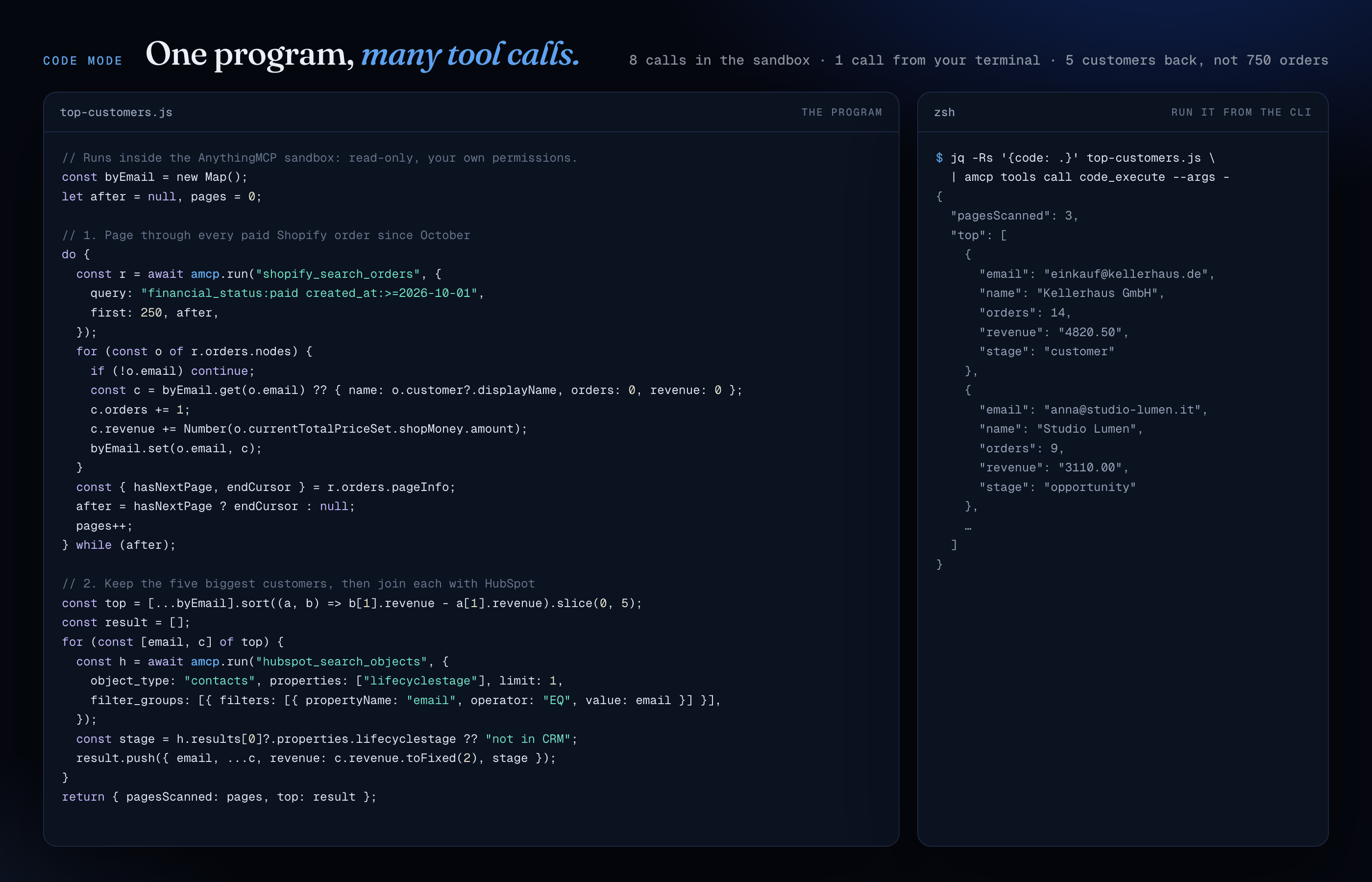
When an MCP server's codeMode is inline, it offers a code_execute tool. You send it a short JavaScript program, and a sandbox next to your tools runs it with three helpers: amcp.search(query), amcp.describe(tool) and amcp.run(tool, args).
The question here: who are our five biggest Shopify customers since October, and where is each one in HubSpot?
// top-customers.js — runs inside the AnythingMCP sandbox: read-only, your own permissions
const byEmail = new Map();
let after = null, pages = 0;

// 1. Page through every paid Shopify order since October
do {
  const r = await amcp.run("shopify_search_orders", {
    query: "financial_status:paid created_at:>=2026-10-01",
    first: 250, after,
  });
  for (const o of r.orders.nodes) {
    if (!o.email) continue;
    const c = byEmail.get(o.email)
      ?? { name: o.customer?.displayName, orders: 0, revenue: 0 };
    c.orders += 1;
    c.revenue += Number(o.currentTotalPriceSet.shopMoney.amount);
    byEmail.set(o.email, c);
  }
  const { hasNextPage, endCursor } = r.orders.pageInfo;
  after = hasNextPage ? endCursor : null;
  pages++;
} while (after);

// 2. Keep the five biggest customers
const top = [...byEmail]
  .sort((a, b) => b[1].revenue - a[1].revenue)
  .slice(0, 5);

// 3. Join each one with its HubSpot contact
const result = [];
for (const [email, c] of top) {
  const h = await amcp.run("hubspot_search_objects", {
    object_type: "contacts",
    filter_groups: [{ filters: [
      { propertyName: "email", operator: "EQ", value: email },
    ] }],
    properties: ["lifecyclestage"],
    limit: 1,
  });
  const stage = h.results[0]?.properties.lifecyclestage ?? "not in CRM";
  result.push({ email, ...c, revenue: c.revenue.toFixed(2), stage });
}
return { pagesScanned: pages, top: result };
$ amcp api PUT /api/mcp-servers/$SRV --yes --data '{"codeMode":"inline"}' # once, admin key
$ jq -Rs '{code: .}' top-customers.js | amcp tools call code_execute --args -
{
"pagesScanned": 3,
"top": [
{
"email": "einkauf@kellerhaus.de",
"name": "Kellerhaus GmbH",
"orders": 14,
"revenue": "4820.50",
"stage": "customer"
},
…
]
}That's 8 tool calls (3 pages of orders and 5 CRM lookups) for one call from your terminal. You get back five customers instead of 750 raw orders, which also matters when the caller is an AI agent: it reads one short answer, so it spends fewer tokens and makes fewer mistakes.
The guardrails:
- Programs can only call read-only tools, with the permissions of the calling key.
- They run in an isolated sandbox: no filesystem, network or environment access, a deadline, and a cap on tool calls per run.
- Every inner call is audited.
- Inline code needs the server's
codeModeset toinlineand a role with the inline-code capability. It's available on the Team plan and above.
When a program is worth keeping, code_propose_tool records it as a proposal for an admin. Once approved, it becomes a named tool for every AI client on the server:
$ jq -Rs '{
    name: "top_customers_with_crm_stage",
    description: "Top 5 Shopify customers since October, with their HubSpot lifecycle stage",
    rationale: "Sales asks for this every Monday",
    code: .
  }' top-customers.js | amcp tools call code_propose_tool --args -
{"ok":true,"proposalId":"cmh4k2…","message":"Proposal recorded for admin review. It will not run or become a tool until an admin approves it."}Install a catalogue connector with its token, give the sales team its own MCP server, attach the connector, turn on code mode and test the connection:
#!/usr/bin/env bash
# bootstrap.sh — needs: amcp login --browser --scope admin
set -euo pipefail

CONN=$(jq -n --arg t "$HUBSPOT_TOKEN" '{credentials: {HUBSPOT_ACCESS_TOKEN: $t}}' \
  | amcp api POST /api/adapters/hubspot/import --data - --yes | jq -r .connectorId)

SRV=$(amcp api POST /api/mcp-servers --yes \
  --data '{"name":"Sales","description":"CRM tools for the sales team"}' | jq -r .id)

amcp api PUT /api/mcp-servers/$SRV/connectors --yes --data "{\"connectorIds\":[\"$CONN\"]}"
amcp api PUT /api/mcp-servers/$SRV --yes --data '{"codeMode":"inline"}'
amcp api POST /api/connectors/$CONN/test --yes
# → { "ok": true, "kind": "ok", "message": "Connection successful" }
The token travels through jq --arg and stdin, so it never shows up in ps or your shell history. Every non-GET call in a script needs an explicit --yes.
Create a REST connector, then import its OpenAPI spec. WSDL, GraphQL, Postman, cURL and HAR work the same way, through source:
ID=$(amcp api POST /api/connectors --yes --data '{
  "name": "Acme Billing", "type": "REST",
  "baseUrl": "https://api.acme.example/v1",
  "authType": "BEARER_TOKEN", "authConfig": { "token": "'"$ACME_TOKEN"'" }
}' | jq -r .id)

amcp api POST /api/connectors/$ID/import --yes \
--data '{"source":"openapi","url":"https://api.acme.example/v1/openapi.json"}'Every tool call, from people or agents, is audited:
$ amcp api GET "/api/audit/invocations?status=ERROR&limit=3" \
  | jq -r '.[] | [.createdAt[11:16], .tool.name, .user.email, .error[:40]] | @tsv'
08:41   hubspot_search_objects   lea@acme.io         HTTP 429: retry after 1s
07:02   shopify_get_order        ops-agent@acme.io   Order not found
06:55   zendesk_get_ticket       marco@acme.io       HTTP 404: RecordNotFound
GET /api/audit/breakdowns?days=30 returns usage and cost by connector, MCP server and user.
On AnythingMCP Cloud, each plan includes a number of active connectors, MCP servers and users, plus File Search and code-mode limits. Before moving to a smaller plan, ask what fits. A read-only management key is enough:
$ amcp api GET "/api/license/plan-fit?plan=starter" \
  | jq -r '.plans.starter | "fits: \(.fits)", (.connectors.pause[] | "pause: \(.name) (\(.calls30d) calls in 30 days)")'
fits: false
pause: Etsy (3 calls in 30 days)
pause: Airtable (0 calls in 30 days)
To choose yourself which connectors stay active, pause one and switch on another. At the plan's limit, switching one on without pausing another first answers 403 with "code": "PLAN_LIMIT":
amcp api PUT /api/connectors/$OLD --yes --data '{"isActive":false}'
amcp api PUT /api/connectors/$NEW --yes --data '{"isActive":true}'
Without ?plan=, it answers for Starter and Team. The connectors and MCP servers used most in the last 30 days stay active. Paused ones are never deleted. The answer also covers users, File Search (folders, files, storage) and code mode (saved code tools, inline code, runs this month). Self-hosted instances have none of these limits and answer 404.
A role grants tools to its members. Each grant can also carry a limit per minute and per hour. The limit counts per user and tool, across all of that user's API keys and sessions. Workspace admins are never limited. Setting limits needs an admin management key:
ROLE=$(amcp api GET /api/roles | jq -r '.[] | select(.name=="Sales") | .id')
TOOL=$(amcp api GET /api/roles/$ROLE/tools | jq -r '.[] | select(.tool.name=="erp_query") | .tool.id')

# 10 calls per minute and 200 per hour for each member of the role
amcp api PUT /api/roles/$ROLE/tools/$TOOL/rate-limit --yes \
  --data '{"callsPerMinute":10,"callsPerHour":200}'

# Remove the per-minute limit and keep the hourly one (null means unlimited)
amcp api PUT /api/roles/$ROLE/tools/$TOOL/rate-limit --yes --data '{"callsPerMinute":null}'
The AI client gets a tool error with the limit and the seconds to wait. Refused calls are logged with an error starting Rate limit reached:
amcp api GET "/api/audit/invocations?status=ERROR&limit=50" \
  | jq -r '.[] | select(.error | startswith("Rate limit reached")) | [.createdAt[0:16], .tool.name, .user.email] | @tsv'
The same limits can be set in the dashboard under Settings → Roles → Manage tools.
| Command | What it does |
|---|---|
amcp login --url URL --server ID |
Save an MCP key for one server's tools (prompted, never echoed) |
amcp login --browser [--scope admin] --url URL |
Mint a management key through the dashboard |
amcp login --management --url URL --key-stdin |
Save an existing management key |
amcp whoami / amcp logout |
Show / remove the current profile |
amcp tools ls [--filter TEXT] |
List tools with their read-only/destructive hint |
amcp tools describe TOOL |
Full description and input JSON schema |
amcp tools call TOOL [--args JSON|@file|-] [--yes] [--timeout S] |
Call a tool |
amcp api METHOD PATH [--data JSON|@file|-] [--yes] |
Call the management API |
amcp api --list [RESOURCE] |
List management operations offline |
amcp completion bash|zsh|fish |
Print a shell completion script |
amcp --version |
Print the CLI version |
Every command accepts --profile NAME and --json.
login prompts for an MCP API key without displaying it. For scripts, use --key-stdin or the AMCP_API_KEY environment variable. Never put the key in a command argument. The CLI checks the key by requesting tools/list before saving it.
It always connects to /mcp/<serverId>, including on Cloud, because the bare /mcp endpoint exposes a different tool set there. Pass the instance base URL to --url, without /mcp/<serverId>. HTTPS is required except for localhost, 127.0.0.0/8 and ::1 during local development. Redirects are refused, so the API key can't follow a request to another origin.
printf '%s\n' "$AMCP_API_KEY" | amcp login --url https://cloud.anythingmcp.com \
  --server YOUR_SERVER_ID --key-stdin --profile cloud
amcp tools ls --profile cloud --filter customer
amcp whoami --profile cloud
amcp logout --profile cloudFor CI, AMCP_URL, AMCP_SERVER and AMCP_API_KEY provide the connection without saving a profile. --url and --server take precedence over their matching environment variables. If a URL comes from --url or AMCP_URL, supply AMCP_API_KEY too: a saved profile key is used only with its saved origin.
Profiles live in $XDG_CONFIG_HOME/amcp/config.json or ~/.config/amcp/config.json, with file mode 0600 on Unix. Relative XDG_CONFIG_HOME values are ignored. whoami shows only a key prefix.
One profile can hold both an MCP key (for tools) and a management key (for api). Logging in with one keeps the other when both point at the same instance.
tools ls shows each tool's name, its read-only/destructive hint and the first line of its description. tools describe shows the full description and input JSON schema.
- Without
--args, the CLI sends an empty object. Arguments must be a JSON object. - Calls time out after 300 seconds by default. Set
--timeout <seconds>for a different positive timeout (fractional seconds are allowed). A timeout exits with code 4 and reportsTool call timed out after <seconds>s. - A tool annotated as destructive asks for confirmation in an interactive terminal. In a non-interactive script, pass
--yesexplicitly. - Tool text goes to stdout. Non-text content is available with
--json.
--json works with every command. It writes one JSON object to stdout:
| Command | JSON output |
|---|---|
login / logout |
the profile |
whoami |
the instance URL, MCP endpoint and masked key |
tools ls |
{ "tools": [...] } |
tools describe |
{ "tool": {...} } |
tools call |
{ "tool": "name", "result": {...} } |
api |
{ "status": 200, "data": ... } |
CLI usage and connection errors go to stderr, also as JSON when --json is set, with the shape { "error": "message", "exitCode": 4 }. A tool's isError result goes to stdout in JSON mode and to stderr in text mode.
| Exit code | Meaning |
|---|---|
0 |
success |
1 |
the tool returned isError, or the API answered 4xx |
2 |
invalid usage or JSON arguments |
3 |
authentication failed (401/403) |
4 |
connection failure, server error (5xx) or timeout |
amcp api calls the instance's management API (/api/*) with a management-scoped key. That covers connectors, MCP servers, roles, users, SSO, settings, memory, skills, learning projects, the knowledge graph and more. It works like gh api, but for AnythingMCP.
A management key is an ordinary MCP API key minted with a management scope: MANAGEMENT_READ or MANAGEMENT_ADMIN. You can mint one from the dashboard or with POST /api/mcp-keys. The key carries its owner's identity and role, and it never grants privilege, so admin-only routes still need an admin owner. MANAGEMENT_READ keys can only call safe methods (GET/HEAD), and connector exports made with them never include secrets, even for an admin owner.
Mint one from the dashboard (Settings → Management API keys), choosing read-only or admin, or let the CLI do it through the browser:
amcp login --browser --url https://cloud.anythingmcp.com            # read-only
amcp login --browser --scope admin --url https://cloud.anythingmcp.com
--browser opens the instance's authorization page, where you approve the request under your existing dashboard session (SSO included). The CLI prints a short verification code; check that it matches the page before you approve.
The dashboard mints the key and returns it to the CLI over a one-shot 127.0.0.1 loopback, so it never appears in a URL, log or shell history. It's an ordinary management key that you can see and revoke in Settings. On a headless machine, set AMCP_NO_BROWSER=1 and open the printed URL yourself. The admin scope is available only to workspace admins.
Log in with a management key (no server needed), then call any endpoint:
printf '%s\n' "$AMCP_API_KEY" | amcp login --management --url https://cloud.anythingmcp.com --key-stdin
amcp api GET /api/connectors
amcp api GET /api/mcp-servers
amcp api POST /api/mcp-servers --data '{"name":"ops","description":"Ops server"}'
amcp api PUT  /api/mcp-servers/SERVER_ID --data '{"codeMode":"inline"}'
For CI, skip the profile and pass the key in the environment:
AMCP_URL=https://cloud.anythingmcp.com AMCP_API_KEY=mcp_… amcp api GET /api/users --jsonThe key comes from AMCP_API_KEY, --key-stdin or a saved management profile, never from a command argument.
- A non-safe method asks for confirmation in a terminal. Pass
--yesin scripts. --dataaccepts inline JSON,@file.jsonor-(stdin).- Output is the parsed JSON body.
--jsonwraps it with the status. - Exit codes match the rest of the CLI:
1for a 4xx result,3for 401/403,4for 5xx or a connection failure. - The management API applies a per-key rate limit, so a runaway client gets HTTP 429 instead of overloading the instance.
The catalogue of management operations ships with the CLI, so listing it needs no key and no network:
$ amcp api --list mcp-servers
mcp-servers
  GET    /api/mcp-servers  — List MCP servers for current organization
  POST   /api/mcp-servers [body]  — Create a new MCP server
  DELETE /api/mcp-servers/:id  — Delete MCP server
  GET    /api/mcp-servers/:id  — Get MCP server detail
  PUT    /api/mcp-servers/:id [body]  — Update MCP server
  …
$ amcp api --list --json   # { "operations": [ { method, path, summary, admin, … } ] }
Each line shows the method, the path, an [admin] tag when the route needs an admin owner, a [body] tag when it takes a request body, and the summary. The catalogue is generated from the backend controllers, and CI fails if a management route is added without regenerating it, so amcp api --list always matches the instance's API. The interactive reference with request examples is in the instance's Swagger UI at /api/docs.
amcp completion <bash|zsh|fish> prints a completion script for commands, tools subcommands and each command's flags. Install it once for your shell:
amcp completion bash > ~/.local/share/bash-completion/completions/amcp
amcp completion zsh > "${fpath[1]}/_amcp"
amcp completion fish > ~/.config/fish/completions/amcp.fish- Bash needs the
bash-completionpackage for the directory above. Without it, addsource <(amcp completion bash)to~/.bashrc. - Zsh needs
compinitenabled. To load the script without writing a file, addsource <(amcp completion zsh)to~/.zshrcaftercompinit.
Open a new shell afterwards. The scripts are static: they don't read the config file or contact a server, so profile and tool names aren't completed. completion always prints the script as plain text, even with --json. Any shell other than bash, zsh or fish exits with code 2.
- The API key is never accepted as a command argument and never printed in status output.
- Keys are stored with file mode
0600. - HTTPS is required except on loopback.
- Redirects are refused, so a key can't follow a request to another origin.
- Writes in scripts need an explicit
--yes. - Management keys are capped by their scope and by their owner's role, rate-limited per key, and audited.
AnythingMCP is an open-source, enterprise agent harness and MCP gateway. It turns any API, SaaS or data source into Model Context Protocol tools your AI agents can use: Claude, ChatGPT, Copilot, Cursor, Gemini and others.
You can connect hundreds of catalogue services (Odoo, SAP, Shopify, HubSpot, Etsy and more), SQL and NoSQL databases, and SFTP/FTP or SMB file shares. You can also import your own OpenAPI, WSDL, GraphQL or Postman definitions. Then you decide which people and which agents may reach each tool, with roles, SSO and a full audit log.
Run it on AnythingMCP Cloud or self-host it. Source and docs: github.com/HelpCode-ai/anythingmcp.
From the repository root:
npm install
npm run build -w packages/cli
node packages/cli/dist/index.js --help
npm test -w packages/cli