3D Interpolation
In contrast to the other approaches, where a virtual target gets mapped to a real target by using a real and a virtual position, the interpolation approach is about creating many small offset points in space and interpolating between them. This can be used, for example, to map a deformed virtual surface onto a differently shaped physical surface. When a user moves the virtual hand over the virtual object surface, the user simultaneously touches the real surface with the real hand.
To make this work smoothly, different offset points are set in the Unity editor. For example, for a cube with different shapes, these could be all the corner points. Now the hand is interpolated while moving along the points or edges. An example is shown below.
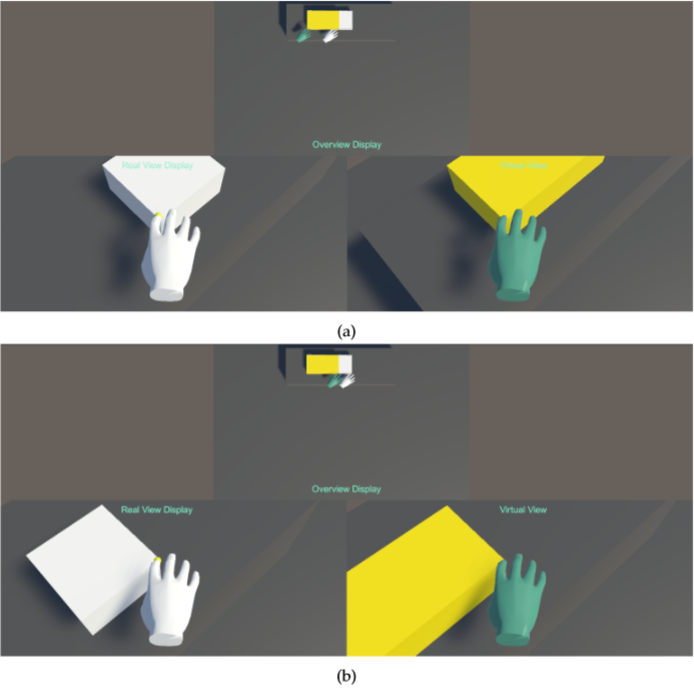 Both picture show the same redirection scenario - a white physical cube is mapped to a virtual larger rectangle cube, indicated as yellow. In this scenario, eight offsets are defined, each for one corner of the cubes. On the top picture (a) the virtual hand touches the bottom left corner of the virtual cube and the real hand the same corner on the physical cube. When the hand now moves along the front edge of both cubes, the hand will reach the right corner of each cube simultaneously (b).
To interpolate between these offsets, various interpolation methods can be used. In the toolkit we have implemented the Inverse Distance Weighting algorithm so far.
The IDW is an interpolation method based on the principle of spatial correlation, i.e. things that are closer together are also more similar in value. The algorithm uses only the distance between the individual measurement points and the point to be calculated as the influencing factor for the interpolation, i.e. the greater the distance, the smaller the influence of the measurement point. The weighting is therefore inversely proportional to the distance. For all real hand positions we can compute the corresponding virtual hand position as following:
Where
is the virtual hand position at the real hand position
and
,
a given distance function from
to
.
is the total amount of points and
is a positive real number, called the power parameter. It influences the weighting of the distance, the higher
is, the more account is taken of the principle that what lies further away is more dissimilar than what lies close.
The implementation can be found in _scripts/Redirection/RedirectionTechniques/Interpolation/InverseDistanceWeighting.cs
public override void ApplyRedirection(Transform realHandPos, Transform virtualHandPos, Transform warpOrigin, RedirectionObject target,
            Transform bodyTransform)
        {
            virtualHandPos.position = IDW(realHandPos.position, target);
        }

    private Vector3 IDW(Vector3 x, RedirectionObject target)
        {
            var u = Vector3.zero;
            var points = target.GetAllPositions();

            var topSum = Vector3.zero;
            var bottomSum = 0f;

            foreach (var point in points)
            {
                var d = Vector3.Distance(x, point.GetRealPosition());
                if (d == 0f)
                {
                    return x + point.GetVirtualPosition() - point.GetRealPosition();
                }
                var w = Mathf.Pow(1 / d, p);


                topSum += w * (point.GetVirtualPosition() - point.GetRealPosition());
                bottomSum += w;

            }

            u = topSum / bottomSum;
            return x + u;
        }