SaiunCLI is a Python framework for creating visually appealing, user-friendly, and highly customizable Command-Line Interface (CLI) tools. It leverages the power of rich for styling and formatting, making it easy to build modern CLI applications that are both functional and beautiful.
Inspired by rich-cli.
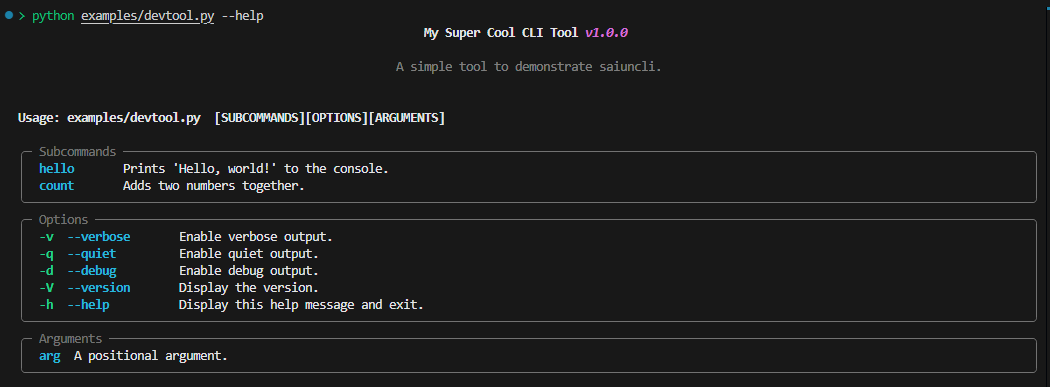
SaiunCLI is actively being developed. Some features may be incomplete or subject to change. Stay tuned for updates and improvements!
- Customizable Themes: Easily style your CLI with themes and override defaults.
- Command and Subcommand Support: Define commands and nested subcommands with specific options and arguments.
- Inherited Options and Arguments: Configure options to be inherited across subcommands.
- Global Options: Define options that apply globally across all commands and subcommands.
- Modern Styling: Leverage rich to make CLI output visually appealing, including tables, progress bars, and spinners.
- User-Friendly Argument Parsing: Parse both positional arguments and flags in a structured and intuitive manner.
- Dynamic Command Registration: Add commands programmatically during runtime.
- Configurable Help and Usage: Auto-generate help messages for commands with customization options.
- Intuitive Developer Experience: Focus on functionality without worrying about low-level details.
| Feature | SaiunCLI | Click | Argparse |
|---|---|---|---|
| Custom Styling | ✅ | ❌ | ❌ |
| Nested Commands | ✅ | ✅ | ❌ |
| Dynamic Commands | ✅ | ✅ | ❌ |
| Option Inheritance | ✅ | ❌ | ❌ |
| Global Options | ✅ | ❌ | ❌ |
| Easy Theming | ✅ | ❌ | ❌ |
You can install saiuncli with pip.
pip install saiuncli
from saiuncli.cli import CLI
from saiuncli.command import Command
from saiuncli.option import Option
from saiuncli.theme import Theme

# Custom theme and console for CLI outputs
theme = Theme()
console = Console(theme=theme)


def hello_handler(name: str, count: int):
    for i in range(count):
        console.print(f"Hello, {name}!")
    console.success("Succcessfully executed handler!")


def count_handler(a: int, b: int):
    if a is None or b is None:
        raise ValueError("Both 'a' and 'b' must be provided.")
    console.print(f"{a} + {b} = {a + b}")
    console.success("Succcessfully executed handler!")


def base_handler(**args):
    console.print("Base command executed.")
    if args:
        console.print(f"{args}")

    console.success("Success Message")
    console.error("Error Message")
    console.warning("Warning Message")
    console.info("Info Message")


if __name__ == "__main__":

    # Create CLI
    mycli = CLI(
        title="My Super Cool CLI Tool",
        description="A simple tool to demonstrate saiuncli.",
        version="1.0.0",
        console=console,
        handler=base_handler, # Command Handler
        help_flags=[],
        version_flags=[],
        options=[
            Option(
                flags=["-v", "--verbose"],
                description="Enable verbose output.",
                action="store_true",
            ),
            Option(
                flags=["-q", "--quiet"],
                description="Enable quiet output.",
                action="store_true",
            ),
            Option(
                flags=["-d", "--debug"],
                description="Enable debug output.",
                action="store_true",
            ),
        ],
    )

    # Define Subcommands
    hello_command = Command(
        name="hello",
        handler=hello_handler,
        description="Prints 'Hello, world!' to the console.",
        options=[
            Option(
                flags=["-n", "--name"],
                description="The name to print.",
                type=str,
                required=True,
            ),
            Option(
                flags=["-c", "--count"],
                description="The number of times to print the name.",
                type=int,
                default=1,
            ),
        ],
    )

    count_command = Command(
        name="count",
        handler=count_handler,
        description="Adds two numbers together.",
        options=[
            Option(
                flags=["-a"],
                description="The first number.",
                type=int,
                required=True,
            ),
            Option(
                flags=["-b"],
                description="The second number.",
                type=int,
                required=True,
            ),
        ],
    )


    # Append Subcommands
    mycli.add_subcommands([hello_command, count_command])

    # Run your CLI Tool!
    mycli.run()