



A python package for generating the shortest sea route between two points on Earth.
If points are on land, the function will attempt to find the nearest point on the sea and calculate the route from there.
Not for routing purposes! This library was developed to generate realistic-looking sea routes for visualizations of maritime routes, not for mariners to route their ships.
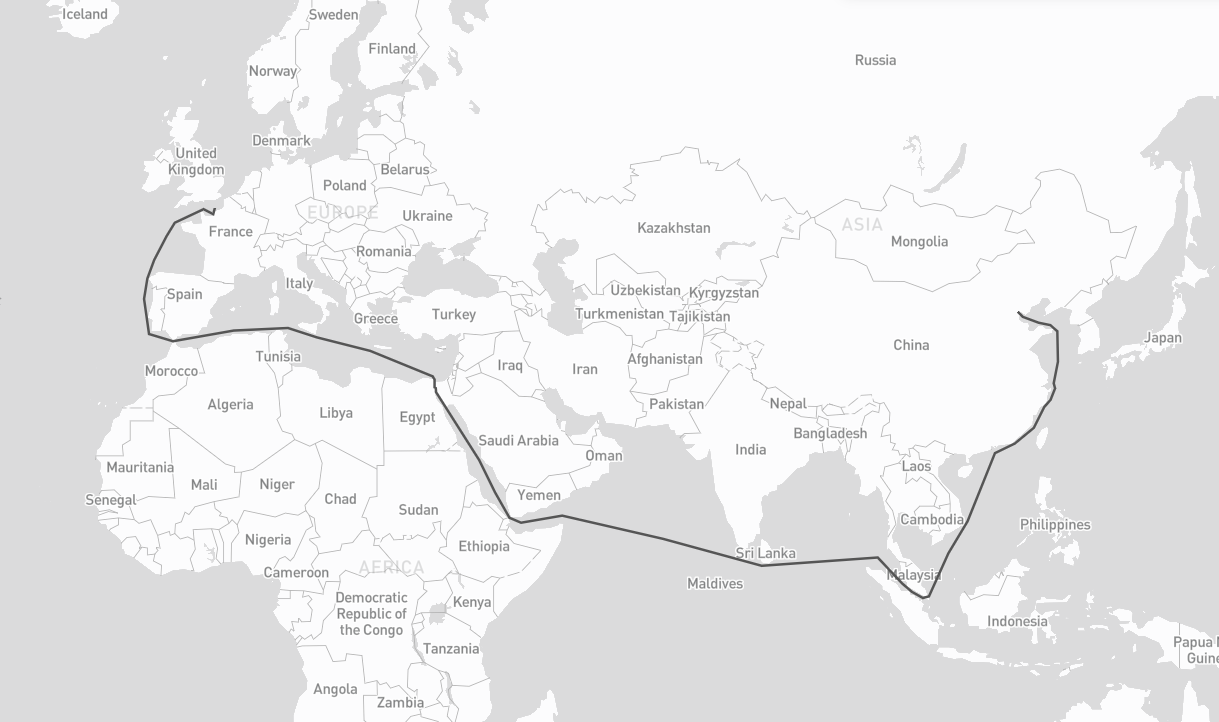
pip install searouteimport searoute as sr
#Define origin and destination points:
origin = [0.3515625, 50.064191736659104]
destination = [117.42187500000001, 39.36827914916014]
route = sr.searoute(origin, destination)
# > Returns a GeoJSON LineString Feature
# show route distance with unit
print("{:.1f} {}".format(route.properties['length'], route.properties['units']))
# Optionally, define the units for the length calculation included in the properties object.
# Defaults to km, can be can be 'm' = meters 'mi = miles 'ft' = feet 'in' = inches 'deg' = degrees
# 'cen' = centimeters 'rad' = radians 'naut' = nautical 'yd' = yards
routeMiles = sr.searoute(origin, destination, units="mi")Core graph abstraction layer for searoute, providing a unified interface over multiple graph backends.
It supports two graph backends:
- networkx (default): Pure Python, no extra dependencies.
- igraph (optional): C-based, significantly faster for large graphs.
- Install with:
pip install searoute[igraph]orpip install igraph
- Install with:
Check performances here.
Basic usage with the default networkx backend
sr.searoute(..., backend = "igraph")  # build the network with igraph

m = Marnet()                          # defaults to networkx
m = Marnet(backend="networkx")        # explicit networkx
m = Marnet(backend="igraph") # igraph (if installed)# using version >= 1.2.0
# nodes representing (1,2) of lon = 1, lat = 2
# required : 'x' for lon, 'y' for lat ; optional 'tt' for terminals (boolean or None)
my_nodes = {
(1, 2): {'x': 1, 'y': 2},
(2, 2): {'x': 2, 'y': 2}
}
# (1,2) -> (2,2) with weight, representing the distance, other attributes can be added
# recognized attributes are : `weight` (distance), `passage` (name of the passage to be restricted by restrictions)
# Note: Ensure that both directions of the edge are included. If (u, v) is added, (v, u) should also be included to account for bidirectional relationships.
my_edges = {
(1, 2): {
(2, 2): {"weight": 10, "other_attr": "some_value u->v"}
}
(2, 2): {
(1, 2): {"weight": 10, "other_attr": "some_value v->u"}
}
}
# Marnet
myM = sr.from_nodes_edges_set(sr.Marnet(), my_nodes, my_edges)
# Ports
myP = sr.from_nodes_edges_set(sr.Ports(), my_nodes, None)
# get shortest with your ports
route_with_my_ports = sr.searoute(origin, destination, P = myP, include_ports=True)
# get shortest with your ports
route_with_my_ntw = sr.searoute(origin, destination, P = myP, M = myM )A node (or vertex) is a fundamental unit of which the graphs Ports and Marnet are formed.
In searoute, a node is represented by it's id as a tuple of lon,lat, and it's attributes:
x: float ; requiredy: float ; requiredt: bool ; optional. default isFalse, will be used for filtering ports withterminals.
{
    (lon:float, lat:float): {'x': lon:float, 'y': lat:float, *args:any},
    ...
}An edge is a line or connection between a note and an other. This connection can be represented by a set of node_id->node_id with it's attributes:
weight: float ; required. Can be distance, cost etc... if not set will by default calculate the distance between nodes using Haversine formula.passage: str ; optional. Can be one of Passage (searoute.classes.passages.Passage). If not not set, no restriction will be applied. If set make sure to updateMarnet().restrictions = [...]with your list of passages to avoid.
{
    (lon:float, lat:float)->node_id: {
        (lon:float, lat:float)->node_id: {
          "weight": distance:float,
          *args: any}
    },
    ...
}## Using all parameters, wil include ports as well
route = sr.searoute(origin, destination, append_orig_dest=True, restrictions=['northwest'], include_ports=True, port_params={'only_terminals':True, 'country_pol': 'FR', 'country_pod' :'CN'})returns :
{
  "geometry": {
    "coordinates": [],
    "type": "LineString"
  },
  "properties": {
    "duration_hours": 461.88474412693756,
    "length": 20529.85310695412,
    "port_origin": {
      "cty": "France",
      "name": "Le Havre",
      "port": "FRLEH",
      "t": 1,
      "x": 0.107054,
      "y": 49.485998
    },
    "port_dest": {
      "cty": "China",
      "name": "Tianjin",
      "port": "CNTSN",
      "t": 1,
      "x": 117.744852,
      "y": 38.986802
    },
    "units": "km"
  },
  "type": "Feature"
}
Preferred ports can be defined using one or more AreaFeature objects:
Start by creating or referencing preferred ports with the PortProps class.A PortProps instance includes:
port_id— the port identifiershare— a positive weight used for selectionprops— optional attributes describing the port (e.g., coordinates or metadata)
# your preferred ports
port_one = PortProps('MY_PORT_ID', 2, {'x':1, 'y':2})
port_two = PortProps('USNYC', 1)
Initiate a AreaFeature with its coords and a name, as well as list of preferred_ports (could be a list, str, or PortProps)
# initiate an AreaFeature
area_one = AreaFeature(coordinates=[[[0,0], [0,10],[0,20], [20, 20], [0, 0]]], name= 'Special_Name', preferred_ports=[port_one, port_two])

# create other AreaFeature
area_two = AreaFeature(...)
When multiple AreaFeature objects contain a point, the smallest area will be used to determine the preferred ports.
Finally, call the function which will return a tuple of 3 values, or 4 values when include_area_name is set to True:
# myPorts is the instance of Port, by default is sr.setup_P()
origin = (11, 12)
pref_ports = myPorts.get_preferred_ports(*origin, AreaFeature.create([area_one, area_two]), top=2, include_area_name = True)areas = AreaFeature.create([area_one, area_two])
sr.searoute(..., include_ports = True, port_params = {'ports_in_areas': areas})-
origin(required) Tuple or array of two floats representing the longitude and latitude of the starting point.Example:
(lon, lat) -
destination(required) Tuple or array of two floats representing the longitude and latitude of the destination point.Example:
(lon, lat) -
units(optional) Unit used to compute the route distance.Default:
kmSupported values:
km= kilometers,m= metersmi= milesft= feetsin= inchesdeg= degreescen= centimetersrad= radiansnaut= nauticalsyd= yards -
speed_knot(optional) Vessel speed used to estimate route duration.Default:
24Unit: knots
-
append_orig_dest(optional) IfTrue, the origin and destination coordinates will be appended to the returnedLineString.Default:
False -
restrictions(optional) List of maritime passages to avoid during route calculation.Default:
["northwest"]Supported values:
babalmandab,bosporus,gibraltar,suez,panama,ormuz,northwest,malacca,sunda,chili,south_africa -
include_ports(optional) IfTrue, the algorithm includes the port of loading (POL) and port of discharge (POD) in the result.Default:
False -
port_params(optional) Additional configuration used wheninclude_ports=True.Available options:
-
only_terminalsInclude only terminal ports. Default:False -
country_polISO-2 country code used to select the Port of Loading (POL). If not provided, the closest port geographically will be selected.Example:
"FR" -
country_podISO-2 country code used to select the Port of Discharge (POD). If not provided, the closest port geographically will be selected. -
country_restrictedFilters out ports that define ato_ctyattribute containing the same country code ascountry_pod.Default:
False -
ports_in_areasOverrides all previous port filtering rules and defines preferred ports within geographic areas.Must be created using:
AreaFeature.create([...])Notes:
- Preferred ports with
share = 0are ignored. - If multiple ports match, the function returns multiple GeoJSON routes.
- Preferred ports with
-
ports_in_areas_fromSame behavior asports_in_areas, but applied only to the origin point (POL). -
ports_in_areas_toSame behavior asports_in_areas, but applied only to the destination point (POD). -
strict_areaOnly relevant when usingports_in_areas,ports_in_areas_from, orports_in_areas_to.Default:
TrueBehavior:
False→ if the point is outside all areas, the closest area is used.True→ if the point is outside all areas, the configuration is ignored.
-
-
return_passages(optional) IfTrue, the result will include the list of traversed maritime passages.Default:
False -
algorithm(optional) The algorithm to perform shortest distance calculation. Options :dijkstra,astarIf concerned by performances, use
astar.Note : The
A staralgorithm uses the Haversine distance heuristic, and only available forbackend= "networkx".Default:
None (dijkstra) -
backend(optional) The backend graph classe acing as interface to graph/network libraries were searoute operates on. Options :networkx,igraphIf concerned by performances, use
igraphwhich is C-based and 3.9x times faster for batch requests.Check performances here.
Default:
networkx
The function returns:
GeoJSON Feature
or (when many routes configured in port_params)
List[GeoJSON Feature]
- NetworkX, a Python package for the creation, manipulation, and study of the structure, dynamics, and functions of complex networks.
- igraph, a Python interface of igraph, a fast and open source C library to manipulate and analyze graphs.
- GeoJson, a python package for GeoJSON
- Eurostat's Searoute Java library