
A powerful, feature-rich, and beautiful SSH TUI client.
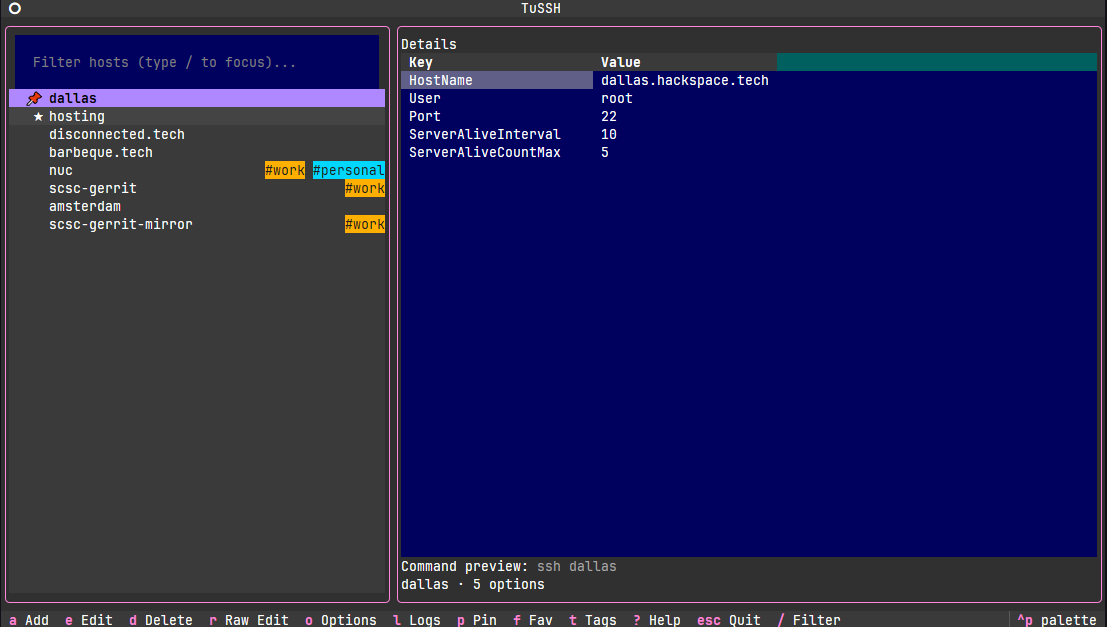
A fast, responsive Textual TUI for browsing and launching SSH hosts from your OpenSSH config.
- Left: searchable host list sorted by usage (most-used first)
- Right: full, merged effective options for the selected host
- Enter connects;
a/e/dadd/edit/delete;ooptions;Escquits
- Reads
~/.ssh/config(plusIncludeglobs); applies OpenSSH “first match wins” - Lists only explicit aliases (wildcards still affect merged options)
- Seamless connect flow: the app stays running, suspends the TUI while SSH/Mosh runs in your terminal, and resumes the UI after you disconnect
- Theme persistence: pick a theme via Ctrl-P palette; TuSSH saves and restores it
- Add/Edit/Delete host blocks (writes only to primary config)
- Notes per host: Markdown formatted notes in the details pane
- Options modal for global extra ssh args and a custom config path
- Choose client: SSH or Mosh (extra SSH args passed to mosh via
--ssh) - Filter quickly with
/(type to filter,Escto leave the filter) - Usage-based sorting: hosts bubble up as you use them more
- Tags, pin, favorites; tag chips toggle with
t - Read-only mode to prevent edits
- Profiles for new hosts (see PROFILES.md)
- Logs view (stderr tail) with copyable commands; press
l - Slide-in help panel with
?
poetry install
poetry run tussh

# or even easier via pipx (or pip):
pipx install tussh
tusshpipx upgrade tussh- Enter: Connect to highlighted host (also works when pressing Enter in the list)
/: Focus the filter input; type to filter;Escto return to lista: Add a hoste: Edit selected hostd: Delete selected host (with confirmation)o: Open Options?: Show the help panelEscorq: Quit (also closes an open modal)- Ctrl-P: Open the palette (pick themes; your choice is saved)
-
Host list (left):
- Sorted by usage (descending), then alphabetically (case-insensitive)
- First host is selected on startup; the list has focus by default
- Filter box sits above the list; it does not steal focus unless
/is pressed
-
Options panel (right):
- Shows the merged, effective options for the selected host
- Non-focusable to keep keyboard focus in the host list
-
Options modal:
- Client: choose SSH or Mosh
- Extra SSH arguments: appended to every connection (e.g.,
-o ConnectTimeout=5) - SSH config path: override the default
~/.ssh/config Esccancels;Savepersists tosettings.json
-
Add/Edit host modal:
- Two-column form: label on the left, input on the right; scrollable content
- Profiles: when adding a host, prefill with presets (Fast connect, Hardened, etc.). See PROFILES.md
- Common fields: Alias, HostName, User, Port, IdentityFile, ProxyJump, ProxyCommand, forwards, keepalives, known hosts file, auth preferences, etc.
- Booleans: Use OpenSSH-friendly values (yes/no). Examples are shown as placeholders.
- “Additional options”: free-form lines that will be written verbatim inside the host block
Esccancels;Savewrites to your primary config when possible
- Primary SSH config: defaults to
~/.ssh/config(override in Options) - Includes: all
Includefiles are read for merging; writes happen only to the primary config - Safety: if a host lives in an included file or shares a multi-alias block, tussh prevents editing and explains what to do
- Usage-based sorting: each successful connect increments a counter per alias
- Linux:
~/.config/tussh/settings.json - macOS:
~/Library/Application Support/tussh/settings.json - Windows:
%APPDATA%\tussh\settings.json
Settings include extra_args, ssh_config_path, client, usage counts, and
theme (the selected Textual theme name).
- SSH: runs
ssh <alias> [extra args] - Mosh: runs
mosh [--ssh="ssh <extra args>"] <alias> - The TUI is suspended while the connection runs, so SSH/Mosh owns the TTY.
The screen is cleared and a brief “Connecting to …” line is printed.
When you disconnect, TuSSH resumes instantly without restarting.
If
suspendisn’t available in your Textual version, TuSSH falls back to the previous behavior andexecs the client. Stderr is appended to~/.config/tussh/ssh_errors.logwith a header per connection; open Logs (l) to view/tail and copy the last command.
- Enter doesn’t connect:
- Ensure the host list has focus (press
Escto leave the filter) - If it still doesn’t work, check your Textual version and report the issue
- Ensure the host list has focus (press
ssh/moshnot found:- Install the client and ensure it’s on
PATH
- Install the client and ensure it’s on
- Theme not persisting:
- Open the palette with Ctrl-P, select a theme; the chosen theme name is
saved to
settings.jsonunderthemeand restored at startup
- Open the palette with Ctrl-P, select a theme; the chosen theme name is
saved to
- Can’t edit/delete a host:
- The host may live in an included file or a multi-alias block; the app will tell you what to change
- Logs are empty:
- Only stderr is captured; successful connections typically don’t log. Ensure the log file is writable.
See PROFILES.md for full details on built-in profiles (Fast connect, Hardened, Low bandwidth, Stable NAT/Idle, Multiplexed persistent, Bastion, Dev/Reverse Tunnels, Kerberos/GSSAPI, IPv4 only, X11 forwarding, Mosh client).
- Writes are confined to the primary SSH config; includes are read-only
- Boolean options are not auto-converted; enter values exactly as you want them written (e.g., yes/no)
- The UI uses a separate stylesheet for layout and modal centering