- Introduction
- Scan Methodes
- Backend
- Frontend
- Installation
- Update
- Additional information
- Closing words
WIFI / LAN intruder detector with web service monitoring. The main functions are as follows:
- Scan your WIFI/LAN-connected devices and receive alerts for unknown device connections.
- Get warnings if an "always connected" device disconnects.
- Assess web service availability by evaluating the HTTP status code, SSL certificate, and service response time.
- Receive notifications if the SSL certificate changes, the HTTP status code changes, or if the service becomes unreachable.
- Detect unwanted/foreign DHCP servers
- Device monitoring using the ping command
There is also a companion script, Pi.Alert-Satellite, which performs its own scans and the results can be sent to an existing Pi.Alert instance.
 Compare this fork with the main project
arp-scan (system utility to search for devices using arp frames), Pi-hole DNS (v5 or v6), Pi-hole DHCP. (v5 or v6), Fritzbox (active Hosts), Mikrotik (DHCP leases), UniFi (Client Devices), OpenWRT (active hosts), AsusWRT (active hosts), pfSense (active hosts, DHCP leases, ARP Table), Satellite Scan (arp-scan, Pi-hole DNS, Pi-hole DHCP, Mikrotik, UniFi, OpenWRT, AsusWRT)
The backend is controlled via the operating system's own cron service and is executed at 5-minute intervals. The task of the backend is to execute the various scans and imports, save the results in the database and send notifications according to the settings. In addition to host detection, it is also possible to check the availability of manually entered hosts or websites for their reachability and to receive notifications in the event of status changes. Various services are available for the notifications (Frontend, Mail (Guide), Pushsafer, Pushover, ntfy and Telegram through shoutrrrr (Guide)).
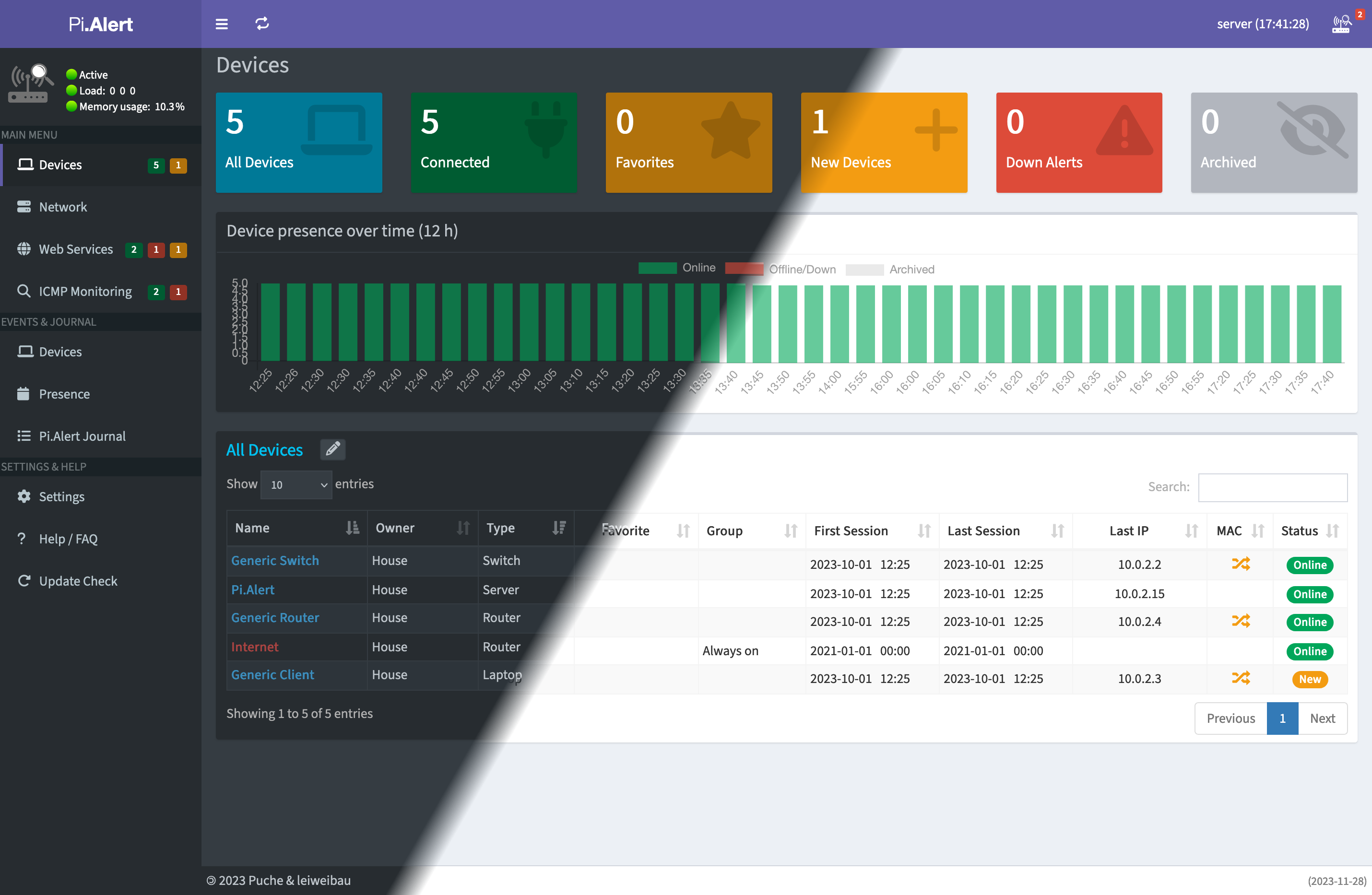
The frontend is used to manage the host information determined and for general management. You can store additional information for each device, view the historical history, perform manual nmap scans or send Wake-on-LAN commands. You also have the option of assigning individual devices to other network devices such as routers and switches in order to maintain an overview of the relationships between the devices. A settings page allows you to configure individual parts of the frontend, while a config file editor allows you to configure the backend. This interface, which is available in English, German, Spanish, French, Italian, Polish, Danish, Dutch, Czech, Finnish, Swedish, Norwegian, Lithuanian, Ukrainian and Russian can be protected with a login that uses the password “123456” by default. You can change this using the CLI tool pialert-cli.
New Favicons/Homescreen icons have been created based on the original design, tailored to different skins. To ensure compatibility with iOS devices, icons can be directly linked from the repository, as iOS devices may not load homescreen icons from insecure sources (without SSL or self-signed SSL).
It is possible to send various requests to the backend with the help of an API. The API can also be used to create an integration in Home Assistant or Homepage.
Initially designed to run on a Raspberry Pi, probably it can run on some other Linux distributions which use the "apt" package manager. Check "Things to keep in mind when using different Linux distributions" before using Pi.Alert with another Debian based distribution like DietPi or Ubuntu Server to see, if there are any special notes to follow.
| Installation |
|---|
|
- Guide for the first start
- If you want to use Pi.Alert as LXC container, feel free to check out the Proxmox VE Helper-Scripts (originally tteck/Proxmox (archived)). I also support this version, as this Pi.Alert version is used with the exception of initial container creation. Updates to the LXC version are also installed from this repository. A separate update command is used for this purpose.
💡 Additional components and information
- Things to keep in mind when using different Linux distributions (will be updated if necessary)
- An initial fork but now independent version of Pi.Alert named NetAlertX based on Docker can be found here: jokob-sk/NetAlertX
- The original, but unmaintained, Pi.Alert can be found here pucherot/Pi.Alert
You can always check for a new release using the "Update Check" button in the sidebar. This check will show you if the GeoLite2 DB is installed or up to date and which new features, fixes or changes are available in the new Pi.Alert release, if you are not already using the latest version.
🔴 If your Pi.Alert installation is located in a user directory ($HOME/pialert), use the updater in the "Updater HOME" section.
🔴 If the Pi.ALert installation is located in the "/opt/pialert" directory, use the updater in the "Updater OPT" section.
| Updater OPT |
|---|
|
- Installation is located in the "/opt/pialert" - Installed Pi.Alert with or after version v2025-12-14 - Or created a Pi.Alert container using the Proxmox Helper Scripts |
| Updater HOME (Outdated) |
|---|
|
- Installation is located in a user directory ($HOME/pialert) - Pi.Alert was manual installed before version v2025-12-14 |
🟢 Help with migrating to the new installation path Here
An archive of older versions can be found at https://leiweibau.net/archive/pialert. This archive contains all release notes of my fork.
If you would like to support me and my work, I offer the following options.
 |
 |
|---|
🙏 A personal thank you to every sponsor of this project.
🙏 A big thank you also goes to everyone who contributed directly or indirectly.
Animated GIF (Loading Animation), Selfhosted Fonts, Bootstrap Icons, Material Design Icons, For final processing of background images, DeepL, ChatGPT
GPL 3.0 Read more here


