Models
Browse 4,000+ AI models across 85+ providers. The Models tab provides a three-column layout with providers, model list, and detail panel. The CLI offers interactive pickers and JSON output for scripting.
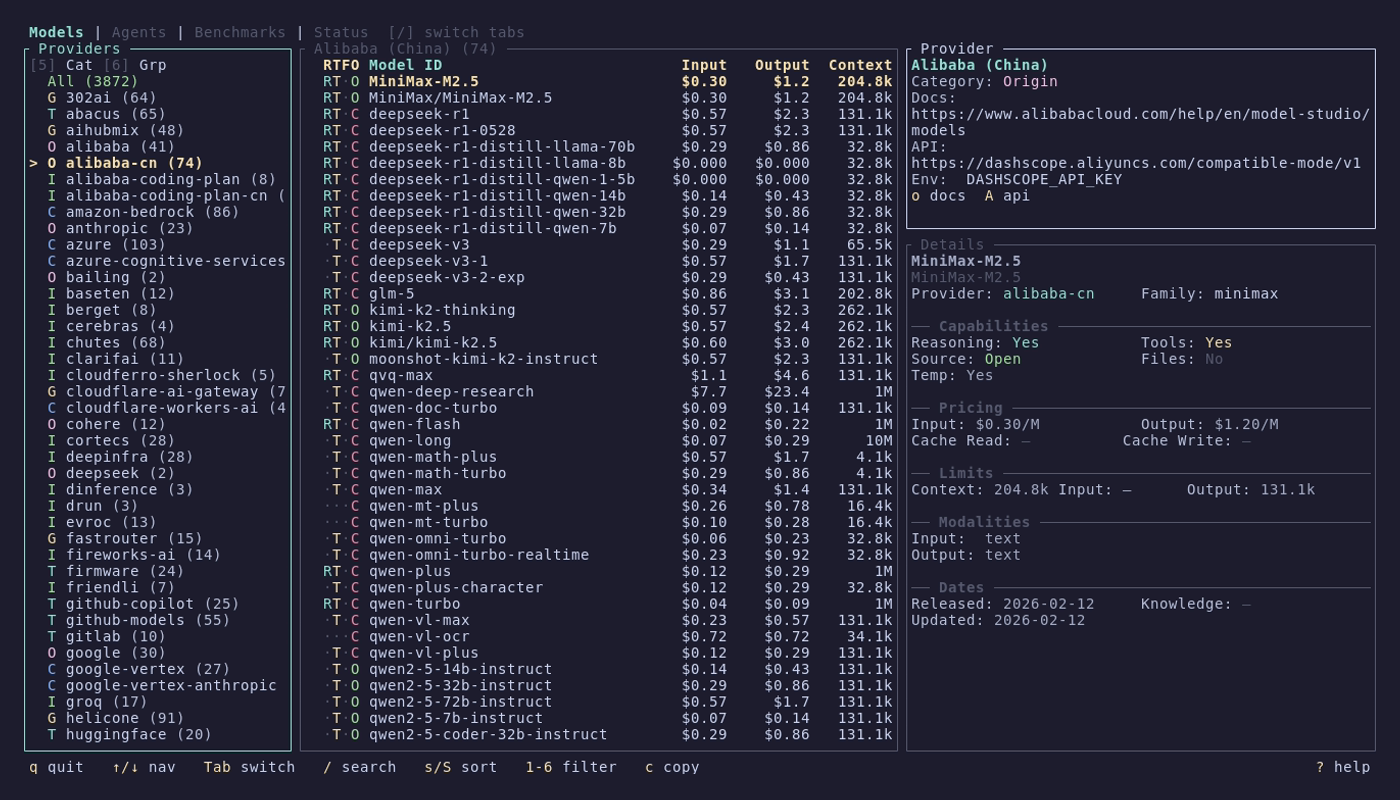
The Models tab uses a three-column percentage layout:
| Column | Width | Content |
|---|---|---|
| Left | 20% | Provider list with model counts |
| Center | 45% | Model list with capability indicators |
| Right | 35% | Detail panel for the selected model |
Use Tab or arrow keys to move focus between columns.
Each model in the list shows four capability indicators:
| Letter | Meaning | Active color |
|---|---|---|
R |
Reasoning | Cyan |
T |
Tool use | Yellow |
F |
File/attachment support | Magenta |
O / C
|
Open weights / Closed weights | Green / Red |
Inactive capabilities show as · in dark gray.
Providers are grouped into five categories:
| Category | Description | Examples |
|---|---|---|
| Origin | Model creators | OpenAI, Anthropic, Google |
| Cloud | Cloud platform providers | AWS Bedrock, Azure, GCP Vertex |
| Inference | Inference-focused providers | Together AI, Groq, Cerebras |
| Gateway | API gateway/routing services | OpenRouter, Helicone |
| Dev Tool | Developer tools and IDEs | Cursor, Vercel |
| Key | Action |
|---|---|
s |
Cycle sort (name, date, cost, context) |
S |
Toggle sort direction (ascending/descending) |
1 |
Toggle reasoning filter |
2 |
Toggle tools filter |
3 |
Toggle open weights filter |
4 |
Toggle free models filter |
5 |
Cycle provider category filter (All, Origin, Cloud, Inference, Gateway, Tool) |
6 |
Toggle category grouping in the provider panel |
Active filters are shown in the panel title. Sort direction is indicated by ↓ (descending) or ↑ (ascending) followed by the sort field name.
The detail panel shows full information for the selected model:
- Header -- model name and provider
- Capabilities -- reasoning, tool use, attachments, open weights
- Modalities -- input and output modality support (text, image, audio, video, pdf)
- Pricing -- input, output, cache read, and cache write costs per million tokens. Free models show "Free" in green
- Limits -- context window size and maximum output tokens
- Metadata -- release date, last updated, knowledge cutoff, provider documentation URL
Missing values display as an em-dash.
| Key | Action |
|---|---|
c |
Copy model-id to clipboard |
C |
Copy provider/model-id (full reference) |
o |
Open provider docs in browser |
D |
Copy provider docs URL |
A |
Copy provider API URL |
Press / to search across model names, IDs, and providers. The search query appears in the panel title as [/query].

models list
models list anthropic    # Prefilter by provider
Opens an inline terminal picker with a side-by-side layout (model table + detail preview). Inside the picker:
-
/starts a live text filter over model ID, name, and provider -
scycles sort modes -
Sreverses the current sort -
ccopies the selected model ID to clipboard -
Enterprints the selected model's full details
models show claude-opus-4-5-20251101
models show gpt-4o
Prints a formatted detail view with ID, provider, family, limits, pricing, capabilities, and metadata.
If the query matches multiple providers or variants in an interactive terminal, the CLI reopens the picker with the matching candidates so you can choose the exact model.
models search "gpt-4"
models search "claude opus"
Uses the same matcher and interactive picker flow as models list.
models providers
models providers --jsonAll model commands support --json for scripting:
models list --json
models show claude-opus-4-5 --json
models search "llama" --json
models providers --json